
 Validity Area

Use
Only the currently valid end non-cumulative and the non-cumulative changes are stored in the database. To be able to evaluate the non-cumulative (for example, to calculate mean values or to execute a drilldown according to period), you need to know for which time interval you can calculate the non-cumulative. Otherwise, a non-cumulative from 01.01.0000 to 12.31.9999 is displayed. The minimum and maximum loaded values of the time reference characteristic (for every feature of the validity table) are thus used as standard as a threshold for the validity area.
Features
Validity area: The differing time-based validity of non-cumulatives is mapped using a validity area. The validity area describes in which time period non-cumulatives have been managed.
Normally this time interval is valid for all records for the InfoCube, for example for all cost centers, materials, etc. The validity interval is comprised of the minimum and the maximum of all postings.

If the first values are posted for a product group on 12.31.1999 and a non-cumulative change was posted for the last time on 3.10.2000, the validity area is the time interval from 12.31.1999 until 3.10.2000.
In certain cases it may be necessary, however, to manually adjust the validity, for example when a characteristic value is only valid for a restricted time period. In this case, you should define a validity area, especially to be able to guarantee correct calculation of averages.
Another example: If the data from various sources systems has been loaded to the InfoCube at different times, it can be sensible to keep the validity area for the respective partial areas.
Source system 1: Delivers values for the current month
Source system 2: Delivers values for the previous month
If the source systems deliver values at different times, aggregation can become affected over a period of time and contain inaccurate values. The calculated monthly average is too high, for example (see example at the end of this section).
All validity areas for a non-cumulative InfoCube are stored in a validity table. This validity table automatically contains the most detailed, selected time characteristic of the InfoCube, the time-reference characteristic.
Validity-determining characteristics: Characteristics that determine the temporal validity area of the non-cumulative in an InfoCube.
Validity-specific characteristics are, for example, characteristics that specify the assignment to a source system. See also: Non-Cumulative Parameter Maintenance.
Aggregation using validity-determining characteristics:
With aggregations that do not calculate an average (MIN, MAX, FIRST, LAST), virtual entries are added in the validity interval margin so that all intervals have the same start and end points. The aggregation is then executed. These virtual entries are highlighted in a special way in the results view. Without these virtual entries, the totals row would deliver inaccurate results. This is not valid for the aggregation type AVERAGE.
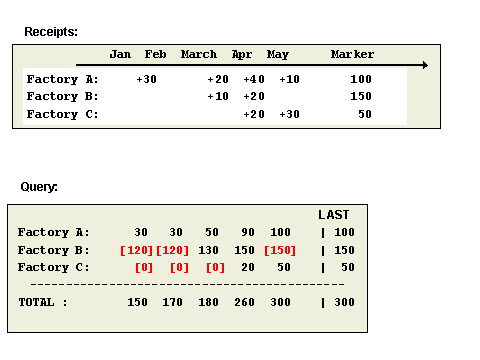
In the following example, the receipts for plants A, B, and C are displayed. The virtual entries are indicated in a special way in the query. Looking at plant B, then there are only receipts in March and April. For January and February, the virtual entry 120 is set, because this is the non-cumulative excluding the receipts from March. For May the virtual entry 150 is set, which is the final non-cumulative for April. In the totals row, the total of virtual entries and the actual non-cumulatives is calculated.

SAP recommends that when you create a non-cumulative InfoCube, you use validity-determining characteristics only in the specified cases. If you have too many validity-determining characteristics or a validity-determining characteristic with a lot of characteristic values, performance decreases considerably.
If you decide later that you require more validity-determining characteristics, you can modify the selection using the report RSDG_CUBE_VALT_MODIFY. In this report, the non-cumulative InfoCube is only changed to the extent that the new validity-determining characteristics are selected and the validity table is reconstructed. The structure of the non-cumulative InfoCube remains the same. You do not have to reload the transaction data for it.
For each combination of characteristic values for the validity-determining characteristics, the validity area is, by default, the interval between initialization (or the first change in non-cumulative) and the last posted non-cumulative change for this combination. That is, the validity area is created from the posting data from when the data was loaded.
When evaluating in reporting, the non-cumulative for the requested time period is evaluated using the current final non-cumulative and the corresponding non-cumulative changes (meaning that the non-cumulative is defined at every moment within the validity area). In this way, the non-cumulatives for time periods for which no change was posted are also identified.
Assuming that every plant delivers its data to the BI System separately at different times, the characteristic Plant has to be validity-determining. If you also assume that the characteristic values are Boston Plant, Dallas Plant, and San Francisco Plant, the validity intervals appear as follows:
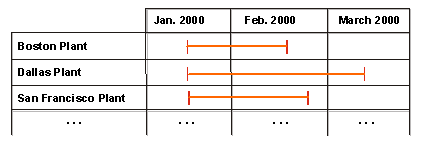
For the Dallas plant and the San Francisco plant, the validity table is maintained as follows:
Plant |
From (fixed) |
To (fixed) |
Dallas |
001.2000 |
003.2000 |
San Francisco |
001.2000 |
002.2000 |
The following data is then displayed in the query:
Plant |
January |
February |
March |
Result |
Comments |
Dallas: Material Stock |
700 |
700 |
900 |
766,66 |
(Æ per month) |
Dallas: Goods Receipts |
200 |
0 |
200 |
400 |
(SUM) |
|
|
|
|
|
|
San Francisco: Material Stock |
200 |
300 |
(300) |
250 |
(Not 266.66!) |
San Francisco: Goods Receipts |
50 |
100 |
(0) |
150 |
(SUM) |
In the query, the average amount from January and February is given as the result for the San Francisco plant since only these time periods have been defined as valid. If a validity area had not been defined, the average given would have been too high (266.66).
See also: