 Managing System Landscape Information
A system landscape description is required by different SAP Solution Manager applications, like Monitoring and Alerting, diagnostics, and for calculations of updates and upgrades with the Maintenance Optimizer.
SAP Solution Manager collects and stores detailed information like about the entire system landscape, for example:
technical system information
logical information, for example about product systems and information about the usage and the relation between technical systems and the software installed on these systems
This information is mostly based on the software descriptions as provided by the SAP software catalog (CR content) and on the information that is automatically sent by technical systems via the System Landscape Directory (SLD).
The Landscape Management Database (LMDB) of SAP Solution Manager is the central landscape information repository. The LMDB uses the same standard (the Common Information Model, CIM) as the SLD to represent system information.
A correct technical system description in the LMDB has the following prerequisites:
Up-to-date CIM model and CR content in the SLD that is connected to the LMDB
Synchronization between the LMDB and the SLD is active
All technical systems register themselves in the SLD.
Some SAP Solution Manager applications can require additional configuration, like the grouping of technical systems.
Avoid manual creation and editing of technical system information. For more information, see Manage Technical Landscape Information.
In contrast, logical landscape information about product systems must be created manually because this information is not provided by the technical systems and the SLD.
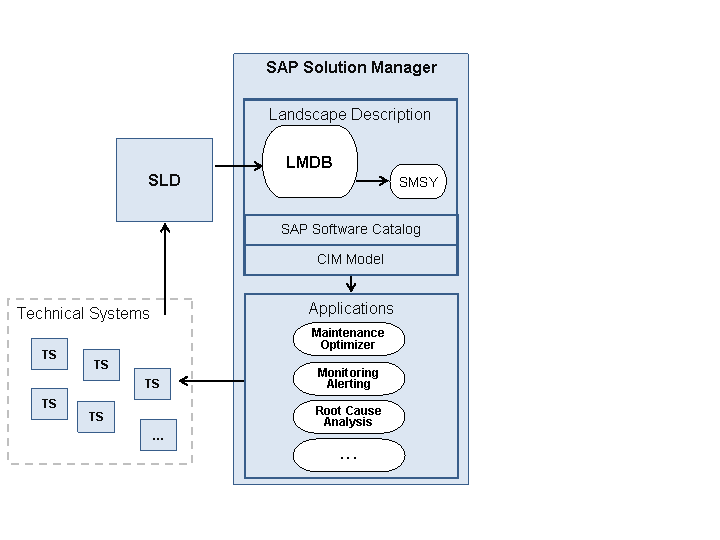
The majority of system information in the LMDB is provided by synchronization with a System Landscape Directory (SLD) in the system landscape, which continuously gathers data sent by the SLD data suppliers, which are installed on the technical systems. Smaller amounts of information in the LMDB are created manually or provided directly by data suppliers like Outside Discovery.
LMDB was introduced with SAP Solution Manager 7.1. If you upgrade from SAP Solution Manager 7.0 to 7.1, the LMDB configuration is mandatory. As of SAP Solution Manager 7.1, technical system data are maintained only in the LMDB, and no longer in SMSY. As of 7.1 SP5, also product system data are maintained in the LMDB.
Activities
System landscape management comprises the following tasks:
Set Up the Landscape Management Infrastructure, including connecting the LMDB to one or more SLDs and migrating system information from transaction SMSY to the LMDB, which is required if you upgrade to SAP Solution Manager 7.1 SP5.
Manage Technical Landscape Information, including technical systems, technical scenarios, host information, RFC connections, and installation keys.
Manage Logical Landscape Information, including product systems, logical components, and landscape verification.