 Master Equipment
Definition
An enhancement of the
Equipment
object type that includes additional properties needed to meet the requirements of armed forces, police, and aid organizations.
The
Equipment
business object is an individual, physical object that must be maintained independently. It can be installed in a technical asset or part of an asset. The master equipment, on the other hand, represents a complete object such as an aircraft.
Use
In the
Support for Flight Operations
area, an aircraft is mapped as the master equipment. Aircraft also contain components that require tracking, which are mapped as equipment.
The master equipment is used in the flight as the reference object. Flight-specific data is copied automatically. This means that the current data for the aircraft itself or for the components is also available in the flight at any time.
You can display master equipment in the following applications:
The various documents such as flights, notifications, and measurement documents are displayed at lower levels.
Assignment of Master Equipment to a Force Element
You can use the report
Master Equipment for Force Element
(transaction /ISDFPS/PMEQSE1) to display an overview of the assignment of master equipment to force elements. To start the report from the SAP Easy Access menu, choose
Logistics
→
Plant Maintenance
→
Management of Technical Objects
→
Equipment
→
Assign Master Equipment
→
Master Equipment for Force Element
. Also see
Report: Assigned Master Equipment
.
Structure
The following fields and pushbuttons are provided for the master equipment on the
Op. Equipment
tab page in the
Create Equipment
(transaction IE01) and
Change Equipment
(transaction IE02) applications:

The
Op. Equipment
tab page is assigned an authorization object. It is displayed only if the necessary authorization is specified in the system for your role.
Identification and Localization
Tail No./ID
Tail number: A unique, customer-specific key for identifying the operational equipment.
Logical System
Name of the logical system containing the change authorization for the master equipment (holder of the master equipment). The system displays a symbol to indicate whether you can change data in the current system. Note that this information is available only if distributed maintenance is active.
Owner
Name of the owner responsible for the master equipment.
Utilizer
Name of the utilizer that uses and keeps stock records for the master equipment.
Area
Description of the area to which the site is assigned.
You can create, change, display, and delete areas by choosing
Logistics
→
Support for Flight Operations
→
Master Data
from the SAP Easy Access menu.
Site
The location of the aircraft on the ground.
You can create, change, display, and delete sites by choosing
Logistics
→
Support for Flight Operations
→
Master Data
from the SAP Easy Access menu. When creating and changing sites (transaction /ISDFPS/LMSI01), you can use the
Site Can Only Be Used Once
indicator to specify that a site can only be assigned to one piece of master equipment at a time.
Note:
In Customizing for master equipment (
Define Model Identification Code (MIC)
Customizing activity), you can set the
Multiple Site Assignment
indicator. You thus specify that an object mapped as master equipment can be assigned to more than one site at once. The single assignment check is thus deactivated. This applies even if you have set the
Site Can Only Be Used Once
indicator for a site.
From the
Op. Equipment
tab page, you can use the relevant pushbutton to display information about the assigned site and to create new sites.
If you require a site assignment for equipment and do not want to designate the equipment as master equipment, you can use the Site Equipment function.
Classification
MPO
Assigned material planning object
RIC
Assigned reportable item code
WS ID
Identification of the weapon system.
You make the Customizing settings for master equipment in Customizing, by choosing
Defense Forces & Public Security
→
Support for Flight Operations
→
Master Equipment
→
Define Model Identification Code (MIC)
Foreign Equipment
The object is a piece of foreign equipment.
Status
Technical Sts
The technical status is set in a maintenance notification or an order/flight and is transferred to the master equipment.
Operational Sts
The operational status is derived from changes to the technical status in the order/flight. It is displayed in the flight.
ACTL Confign Cd
The configuration is defined as the configuration code in the master equipment. The actual configuration code describes the aircraft’s current configuration. This data is displayed in the flight.
Comments
Text field for comments.
Usage Rate
You can use the
Usage Rate
pushbutton to display the planned or actual use of an aircraft. The usage rate is calculated based on a predefined annual performance and displayed for a particular month.
You can use the default settings to configure the usage rate as follows:
By the prioritization category
You can use the prioritization category to choose between flying hours and priority.
By the priority
You can select priorities (for example, do not use, use often) in this selection field.
You make the Customizing settings for the usage rate in Customizing, by choosing
Defense Forces & Public Security
→
Support for Flight Operations
→
Master Equipment
→
Define Usage Priorities
Create
You can use the
Create
Master Equip.
pushbutton to make the input fields on this tab page ready for input when creating and changing equipment. Only then can you enter data on this tab page and thus save the master equipment.
Tech. Sts Overview
You can use the
Overview of Technical Statuses
pushbutton to call a new dialog box in which the technical status of the master equipment is displayed (transaction /ISDFPS/LMTST1 in display mode).
Chnge Docs. MstrEq
You can use the
Master Equipment Change Documents
pushbutton to display the change documents for this master equipment.
Integration
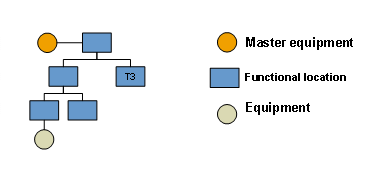
You can create a master equipment hierarchy in one of two ways:
You can assign the master equipment to the highest functional location in the hierarchy.
You can position the master equipment at the top of an equipment hierarchy.

A structure may not have more than one piece of master equipment.
The following graphic shows a structure with several functional locations to which equipment is assigned. The master equipment is assigned to the highest functional location in the hierarchy.
Master Equipment
The master equipment is also integrated with the following objects:
Maintenance Notification
Means used to enter and manage operating notifications in the Maintenance area. Certain requirements (for example, those relating to breakdowns) are entered in notifications.
Flight
The master equipment is a reference object for the flight. If a flight is created with reference to the master equipment, certain data such as the operational status, technical status, and actual configuration is transferred from the master equipment. Some of the data can also be transferred in the opposite direction (for example if the technical status is changed).
Force Element
The master equipment is linked to the force element. This produces other relationships.
You make the Customizing settings for the equipment category in Customizing, by choosing
Defense Forces & Public Security
→
Support for Flight Operations
→
Master Equipment
→
Assign Status Profile to Equipment Category
Changes to Master Equipment
The master equipment is a basic maintenance module and has a master data record. The individual processes result in changes to the master equipment master data.

An aircraft has various components (configuration), which are specified in the master equipment as the actual configuration. After an aircraft has completed an operation, the configuration has changed. As a result, the master data of the master equipment (in this case the configuration) must be changed.
You can make changes directly to the master equipment or indirectly via other objects:
Direct changes are:
All text fields
Tail No./ID
Site
Technical Status
Via order/flight or notification.
Operational Sts
Based on the technical status; set manually.
Configuration Code
Possible via confirmation.
Indirect changes (via relationships) are:
Force Element
The master equipment is linked to a different force element.
Assignment to material planning objects
Reportable Item Code