 Role Generator
Use
You use the
Role Generator
to automatically update user authorizations in accordance with their organizational assignments. For more information about the process, see
Assignment of Authorizations
.
Integration
The authorization update with the
Role Generator
can be started using the following mechanisms:
Class /ISDFPS/CL_ROLEMAN (method OBJECT_UPDATE) or function module /ISDFPS/ROLEMAN_UPDATE_USERS
Features
The
Role Generator
first determines the
organization level fields
that have no values for each user in the authorization objects. The authorization objects are assigned to the
Role Generator
directly or indirectly using roles. To do so, it uses the evaluation paths US_ACT_GR, DFPS_ RMR, and DFPS_RMU.
The
Role Generator
then identifies the
organization level fields
for which no values are defined in the authorization objects of the roles, which are directly or indirectly assigned to it. Again, this takes place for each user. To do so, it uses the evaluation paths US_ACT_GR, DFPS_ RMR, and DFPS_RMU.
It then determines the missing values for the organizational level fields using the next force element that is assigned.
For each user assigned to the user group SAP_ROLEMAN, the system generates role SAP_RM_<user name> and assigns it to the user. In each case, these roles contain the authorization objects for which the
Role Generator
has identified organizational level fields and determined the corresponding values.
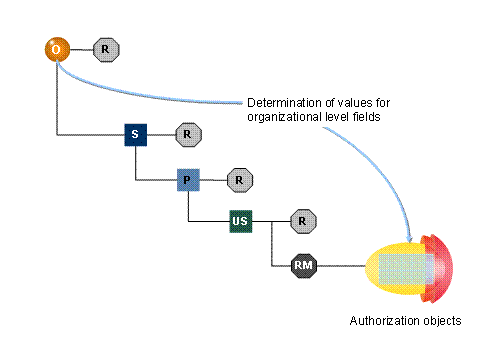
Role Generator
O = Force element (organizational unit), S = Position, P = Person, US = User, R = Role, RM = Role Generator Role (SAP_RM_<user name>)
The following assignments provide the overall authorizations of a user:
Authorizations based on roles assigned directly to the user
Authorizations based on roles assigned indirectly to the user (person, position, and force element roles)

Roles can also be assigned using collective roles.
Authorizations (values for organizational level fields) that the role generator determined using the organizational assignments of the user