 Requirement Prioritization
Use
The standard functions of the
Materials Management
component for requirement prioritization are enhanced by the following functions in the
Defense Forces and Public Security
component:
Definition of organizational priority of a force element
Prioritized materials planning
Integration
The following graphic illustrates the overall relationship between priorities:
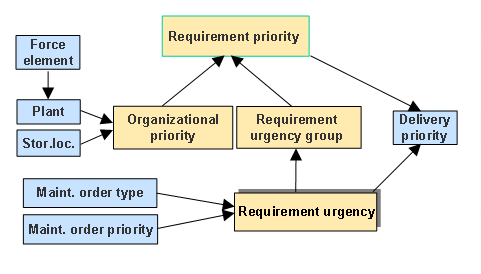
Overview of requirement prioritization
The connection of the force elements to the standard functions is achieved using the plant/storage-location combination of the requesting force element.
Prerequisites
You are familiar with requirement prioritization. For more information, see
SAP Library under
SAP ERP Central Component
→
Logistics
→
Materials Management (MM)
→
Purchasing (MM-PUR)
→
Further Functions
→
Requirement Prioritization
in Customizing under
Materials Management
→
General Settings for Materials Management
→
Requirement Prioritization
Features
The following component-specific functions are available:
Organizational priority of a force element
The organizational priority specifies what priority a force element has when material requisitions are determined.
You can manually assign the organizational priority to a force element (with MRP area) on the
logistics data
tab page of the
Structures Workbench
. The system determines the organizational priority in the documents on the basis of the receiving storage location (and thus the receiving force element).
To this end, you define the desired values for the organizational priority in Customizing by choosing
Materials Management
→
General Settings for Materials Management
→
Requirement Prioritization
→
Define Organizational Priorities
.
Manual Customizing entries for prioritizing storage locations (IMG activity
Assign Plants and Storage Locations
) are not required. If an organizational priority has already been assigned to the force element, the system carries out the plant/storage location assignment automatically when a force element is activated.
Prioritized materials planning
For more information, see