 Campaign Integration Between SAP APO and SAP ERP
Once you save your planning in planning version 000, campaigns planned in SAP APO, along with their orders, are transferred to SAP ERP. In SAP ERP, the APO planned orders are converted to SAP ERP process orders. You can execute this process in SAP APO. The process orders are processed in SAP ERP; therefore, their data is confirmed and business transactions are executed. The statuses of the ERP process orders change depending on their processing status. As a result, the status of the corresponding APO orders changes. The APO campaign derives its status from the statuses of the APO orders.
The planning aspect of campaigns is important to SAP APO, and the cost and how the costs are settled is relevant to SAP ERP. A campaign that is no longer important for the planning in SAP APO must exist in SAP ERP until its orders are settled. Integration must make sure that the dissolving of a campaign in SAP APO does not lead to the dissolving of the corresponding campaign in SAP ERP.
You can compare and reconcile production campaigns using the CIF - Comparison/ Reconcilitation of Transaction Data
report. See Comparison and Reconciliation of Production Campaigns.
Prerequisites
You have established the integration between SAP APO and the SAP ERP system. For more information, see Integration of SAP APO and SAP R/3.
You already process campaigns in the SAP ERP System. For more information, see the SAP Library of SAP ERP at

Logistics

Production Planning and Control
Production Planning - Process Industries
Production Campaign
 .
.In Customizing for
Production Planning and Detailed Scheduling
under Global Settings
Global Parameters and Defaults
, you have selected the No Restrictions
entry.The system removes orders from campaigns and dissolves campaigns without taking the order status into account. For more information, see Production Campaign Statuses.
 Note
Note
Delta reporting for campaign planning requires SAP ERP 2005 with Enhancement Pack 03 or higher.
Features
Functions supported by the APO Core Interface (CIF) are described below.
Deleting an Order in SAP APO
When an ERP process order has one of the following statuses, the corresponding process order is deleted in SAP APO:
Closed
Technically completed
Deletion indicator
Dissolving a Campaign in SAP APO
When you choose Dissolve Campaign
in SAP APO, the following system activities are triggered in SAP APO and SAP ERP:
APO campaign and ERP campaign comprise the same orders

The SAP APO campaign contains orders O1 and O2. The corresponding campaign in SAP ERP contains the same orders. When you choose Dissolve Campaign
in SAP ERP, the campaign is deleted in SAP ERP and SAP APO.
APO campaign comprises less orders than the ERP campaign

The SAP ERP campaign contains orders O1 and O2. However, the corresponding campaign in SAP APO only contains order O1. Order O2 was automatically deleted in SAP APO because it has a status of Completed
, Technically completed,
or Deletion
indicator
in SAP ERP.
When you choose Dissolve Campaign
in SAP APO, the campaign is:
Deleted in SAP APO
Not deleted in SAP ERP Order O1 is only removed from the campaign. The campaign with order O2 is retained in SAP ERP.
APO campaign is empty

The SAP ERP campaign contains orders O1 and O2. However, the corresponding campaign in SAP APO does not contain any orders. Order O1 and O2 were automatically deleted in SAP APO because they have a status of Completed
, Technically completed,
or Deletion
indicator
in SAP ERP.
When you choose Dissolve Campaign
in SAP APO, the campaign is:
Deleted in SAP APO
Not deleted in SAP ERP Orders O1 and O2 are not removed from the campaign.
Dissolving a Campaign in SAP ERP
ERP campaign and APO campaign comprise the same orders

The SAP ERP campaign contains orders O1 and O2. The corresponding campaign in SAP APO contains the same orders. When you choose Dissolve Campaign
in SAP ERP, the campaign is deleted in SAP ERP and SAP APO.
ERP campaign comprises less orders than the APO campaign

The SAP APO campaign contains orders O1 and O2. However, the corresponding campaign in SAP ERP only contains order O1. Order O2 was removed from the campaign in SAP ERP since it was already settled.
When you choose Dissolve Campaign
in SAP ERP, the campaign is:
Deleted in SAP ERP
Not deleted in SAP APO Order O1 is only removed from the campaign. The campaign with order O2 is retained in SAP APO.
ERP campaign is empty
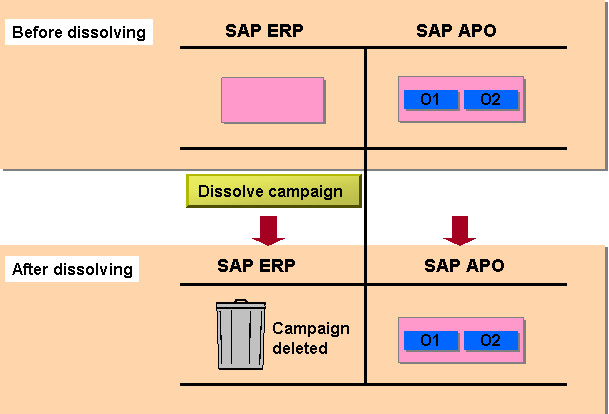
The SAP APO campaign contains orders O1 and O2. However, the corresponding campaign in SAP ERP does not contain orders.
When you choose Dissolve Campaign
in SAP ERP, the campaign is:
Deleted in SAP ERP
Not deleted in SAP APO, and orders O1 and O2 are not removed from the campaign
If orders, especially planned orders, are in a campaign in SAP APO or SAP ERP and do not exist in the other system, the system behaves in the same way.