 SAP NetWeaver Information Lifecycle Management
SAP NetWeaver Information Lifecycle Management (SAP NetWeaver ILM)
enhances the SAP standard delivery with the ability to manage the lifecycle of live and archived data based on rules. SAP NetWeaver ILM
uses ILM-specific, enhanced functions of data archiving.
Typical Features
Lifecycle Management of data with the following Retention Management functions:
Defining ILM rules (for example, retention rules) for the purpose of mapping legal requirements and their application to live and archived data.
Putting legal holds on data that is relevant for legal cases in order to prevent early destruction.
Destroying data while taking legal requirements and legal holds into account.
Storage of archived data on an ILM-certified WebDAV server (to guarantee non-changeability of the data and to protect it from premature destruction)
Application Scenarios
The Retention Management functions of SAP NetWeaver ILM
enable the optimization of data volume for live application systems as well as the decommissioning of legacy systems. In the latter case, you use the Retention Management functions of SAP NetWeaver ILM
in a stand-alone ILM system (Retention Warehouse) for the administration of the transferred legacy data.
The following figure depicts the integration of the Retention Management functions of SAP NetWeaver ILM
in both application scenarios.
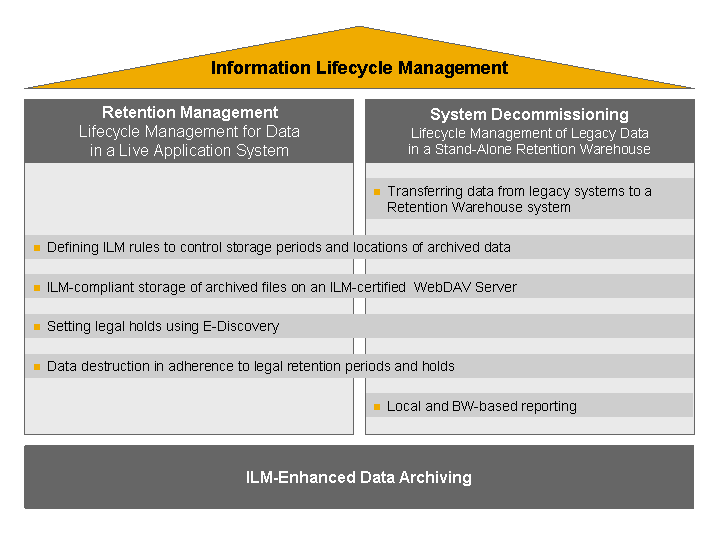
Application Scenarios of SAP NetWeaver ILM
Application Scenario |
Target |
Description |
|---|---|---|
Retention Management in a live application system |
Optimization of the data volume of an application system by moving data that is no longer required for operations to a storage system and by destroying live data and stored data according to legal requirements. |
You define the ILM rules, for example, the minimum and maximum retention periods and you store the archived data, which is structured according to the criteria of the ILM rules, in the ILM store. The stored data can be retrieved for tax audits or for the purpose of product liability. If necessary, you can set legal holds on the data. You can destroy data on which there is no legal hold and whose retention period has expired. You can destroy data in the ILM store as well as data in the system's database. |
System decommissioning using a stand-alone ILM system (Retention Warehouse). |
Enabling the decommissioning of legacy systems by transferring legacy data to an ILM Retention Warehouse and by retaining and destroying the legacy data independently of the legacy system according to legal requirements. |
You archive the complete dataset of each system to be decommissioned using the functions provided by SAP. Then you transfer all data to the ILM Retention Warehouse and store them in the ILM store of the Retention Warehouse system according to the criteria specified by ILM rules. The stored data can be retrieved for tax audits or for the purpose of product liability, regardless of the legacy system, with BW queries or local queries . If necessary, you can set legal holds on the data. You can destroy data on which there is no legal hold and whose retention period has expired. |
Procedure
1. Prepare to Use SAP NetWeaver ILM
Make SAP NetWeaver ILM
available by providing an ILM store, activating the appropriate Business Functions
, authorizing users for ILM functions, and by configuring all of the functions.
For more information, see: Making SAP NetWeaver ILM Available
2. Use SAP NetWeaver ILM
To call up the scenario-specific functions relevant to the application scenario, use the appropriate ILM cockpit:
Use the functions of
SAP NetWeaver ILM
to optimize the data volume of a productive application system. TheILM Retention Management Cockpit
gives you access to the relevant functions.For more information, see: Using ILM Retention Management in the Application System
Use the functions of
SAP NetWeaver ILM
to transfer data from a decommissioned legacy system to an ILM system (Retention Warehouse) and to manage its lifecycle. TheILM Retention Warehouse Cockpit
gives you access to all relevant functions.For more information, see: Using ILM Retention Warehouse for System Decommissioning