 Configuring XML Data Archiving Service for ILM Stores
You can use the XML Data Archiving Service (XML DAS)
that runs on AS Java to control all transactions triggered by SAP NetWeaver ILM
in conjunction with an ILM store. After installing AS Java, you have to define the basic XML DAS
configuration and make the ILM store available.
The following figure shows the relevant components for the ILM store and the required basic configuration.
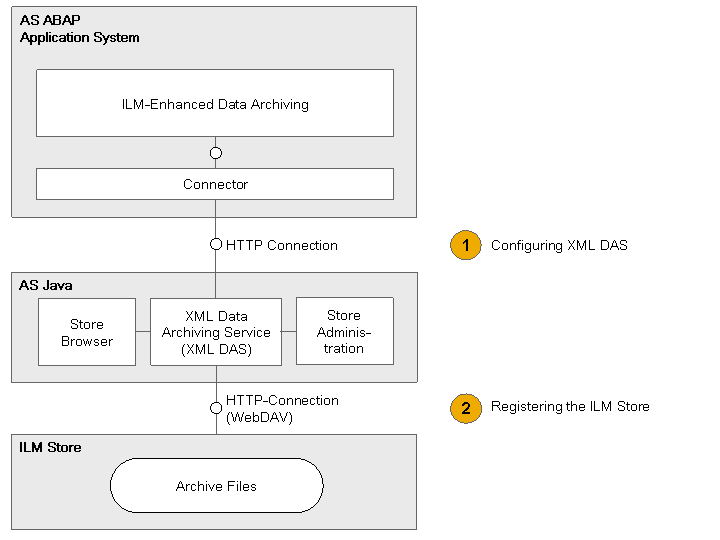
Configuration for Managing ILM Stores with XML DAS
Component |
Description |
|---|---|
Application System |
Live application system or stand-alone Retention Warehouse system (AS ABAP) on which The protocal is either HTTP or HTTPS. In the application system, you need to define a connection to |
ILM-Enhanced Data Archiving |
|
Connector |
The communication between the archiving programs, the archiving objects, and |
XML Data Archiving Service (XML DAS) |
The |
Store Administration |
The administration functions of the |
ILM Store |
Store for the archive files that were generated according to ILM retention rules on a WebDAV server certified for |
Store Browser |
The store browser displays all ILM stores with their store hierarchies and the resources stored under them. |
Procedure
1. Configuring XML DAS
Create the required users in user management.
For more information, see: Using ILM to Provide Users for the Use of XML DAS
Define the connection to
XML DAS
in the application system or in the Retention Warehouse system.For more information, see: Establishing an HTTP Connection from the Application System to XML DAS
2. Connecting and Registering the ILM Store with XML DAS
Allow the
XML DAS
to access the ILM store.For more information, see: Defining the Connection of the ILM Store to XML DAS
Register the ILM store in
XML-DAS administration
.For more information, see: Registering the ILM Store in XML DAS Store Administration
3. Check the Availability of ILM Stores and View Store Hierarchies
In the store browser, check the availability of the ILM stores and the created store hierarchies.
For more information, see: Using ILM Store Browser for XML DAS-Based ILM Stores