
 Taxonomies
Documents are assigned to categories in a taxonomy. Each category only contains documents that have similar contents or that are related to the same topic. The categories in a taxonomy form a hierarchical ordering of terms.

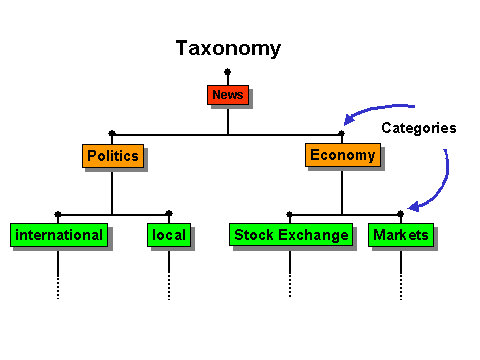
The News taxonomy contains the categories Politics and Economy. These categories contain the sub-categories Stock Exchange, Markets, and so on.
Use
A taxonomy brings order to extensive document sets by making documents accessible in a clear structure using superordinate terms. Starting from the superordinate categories, you can navigate deeper into the structure of the taxonomy: You do not lose your orientation within the document set, and always know where you are in the structure. This makes it possible to find information quickly and easily.
Query-Based and Example-Based Taxonomies
There are two ways to create a taxonomy:
· As a query-based taxonomy
· As an example-based taxonomy

These two
ways of creating a taxonomy correspond to the query-based and example-based
classification procedures. You can only carry out query- or example-based
classification after you have created a query- or example-based taxonomy (see
 Classification
(Classifying Documents).
Classification
(Classifying Documents).
Logical View (Taxonomy) and Physical view (File System)
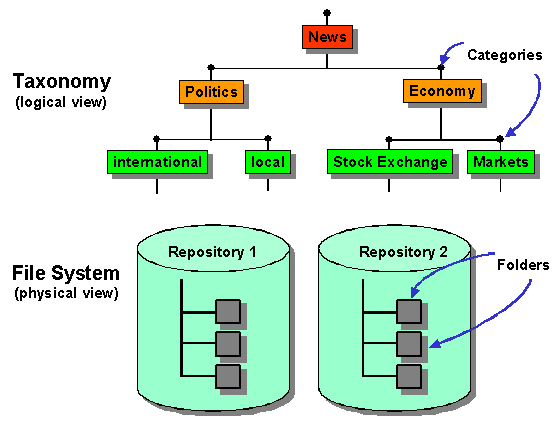
The categories in a taxonomy have a similar function to the folders in a file system. However, in contrast to normal folders in a file system, the categories themselves do not contain documents: If users want to look at the contents of a category, the system generates links to the physical documents that are classified into the category in question. The physical documents are actually stored in folders or repositories. It is irrelevant which repositories contain the physical documents. The biggest advantage of a taxonomy is that you can find all information on a certain topic in a category without having to know where the individual documents are actually stored.
See also
Classification
(Classifying Documents)
What is a Query-Based Taxonomy?
What is an Example-Based Taxonomy?