
 Defining
Search Queries (Advanced View)
Defining
Search Queries (Advanced View) 
Use
This section describes options for defining search queries in the advanced view.
Features
In the advanced view, you can formulate complicated expressions with the Boolean operators AND and OR. The search query is depicted in a hierarchical structure.
You can select a Boolean operator in the upper left-hand side of the screen. The operator refers to all conditions and expressions that are indented one level to the right beneath the dropdown list.
The graphic below displays in schematic form the way in which a search query is depicted on the screen.
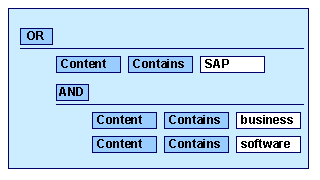
The request in the graphic means:
SAP OR (business AND software)

If a search query is so complex that it cannot be depicted in the simple view, you are no longer able to go back to the simple view.
Excluding values
You can use the Boolean operator NOT to exclude documents with certain values from the search results. The operator NOT can only be selected as part of relational operand in the dropdown list Comparison, for example, is not or does not contain.

Example: Content contains ‘mouse’ AND content does not contain ‘computer’

Avoid combinations of the operators NOT and OR.
For example, the search query Content contains ‘Mouse’ OR content does not contain ‘computer’ finds all documents in the index that do not contain the word ‘computer’ regardless of whether they contain the word ‘mouse’.
Activities
Create new conditions and expressions by choosing Actions. You can also use this menu to copy part of the search query to the clipboard or to delete part of it.
See also:
Copying and Pasting Search Queries