
 Navigation

Use
You use these functions to navigate through your code.
Features
You can access all the features listed below by right-clicking anywhere in your source code and choosing the relevant function from the context menu.
Action |
Menu Item |
Go to a specific line in the code |
Navigation → Go To Line |
Go to the last change you have made |
Navigation → Go To Last Change |
Go to the previous change in the code |
Navigation → Navigate Backward |
Go to the next change in the code |
Navigation → Navigate Forward |
Go to the next identical structure in the code |
Next Identical Structure Level |
Go to the previous identical structure in the code |
Previous Identical Structure Level |
Go to the beginning of a unit in the code |
Go To Start Of Unit |
Go to the end of a unit in the code |
Go To End Of Unit |
Scroll Navigation
Scroll navigation provides information about the current position in the code as a scroll tip. The scroll tip displays the current position in the code and the range of lines that are currently visible.
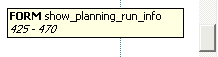
Scroll Tip Displaying the Current Position in the Document
See also: