
 Bookmarks

Use
You use bookmarks to navigate easily in your source code.
Features
You can access all the features listed below by right-clicking in the indicator margin and choosing the relevant function in the context menu.
Bookmarks
The Front-End Editor supports named and unnamed bookmarks. You can set up to nine numbered bookmarks and an unlimited number of additional bookmarks by choosing Bookmarks → Bookmark (0-9).
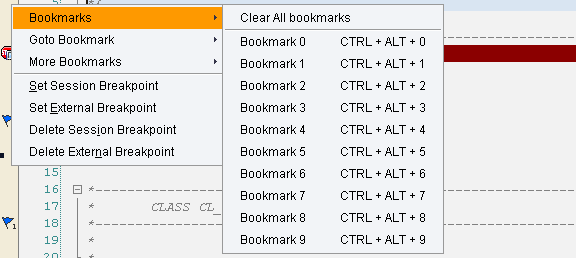
Bookmarks
Once you have set up bookmarks, they appear as numbered blue flags in the indicator margin. You can clear them all by choosing Bookmarks → Clear All Bookmarks.
Go To Bookmarks
You can go to a bookmark by choosing Goto Bookmarks → Bookmark (0-9). You can also jump to them by pressing CTRL + <the bookmark number>.
Toggle Bookmarks
You can toggle between bookmarks by choosing More Bookmarks → Toggle Bookmark.
Switching Between Bookmarks
You can choose the following options:
● Next Bookmark allows you to go to the next bookmark
● Previous Bookmark allows you to go to the previous bookmark