
 Mouse Pointer and Caret Styles

Use
The editor provides different mouse pointer, cursor and caret styles for overwriting, inserting, interactive searching, and block selection.
Features
Mouse Pointer
● Binoculars with a pointing arrow
You can see the pointer changing its shape to binoculars with an arrow pointing down, when you choose Find Incremental.
● Cross pointer
You can see the pointer changing its shape to a cross pointer when you select a block.
● Double-sided arrow
You can see the pointer changing its shape to a double-sided arrow when you position it in the Window splitter area.
Caret Styles
The caret can take several forms.
● Solid vertical black bar
You can see the caret in this form when it is in OVR (overwrite) mode. It is blinking at the point, where you have positioned it in the code.
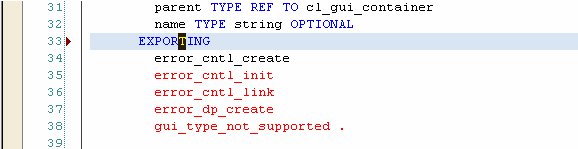
Solid Vertical Black Bar
● Vertical line
You can see the caret in this form when it is in INS (insert) mode. It is blinking at the point where you have positioned it in the code. The INS mode allows you to insert text between characters without deleting them.
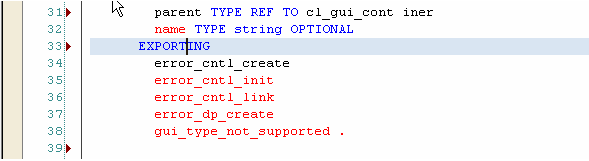
Vertical Line

You can switch between these two caret modes by choosing them from the Active Status Bar.