
 Configuration Objects

Configuration Objects for Integration Server Communication
During configuration you set up a process (which is modeled in the ES Repository, for example) for a specific system landscape.
The following graphic shows a part of a process for a simple system landscape: A sender system sends a message to the Integration Server. The Integration Server forwards the message to one of two possible receiver systems.
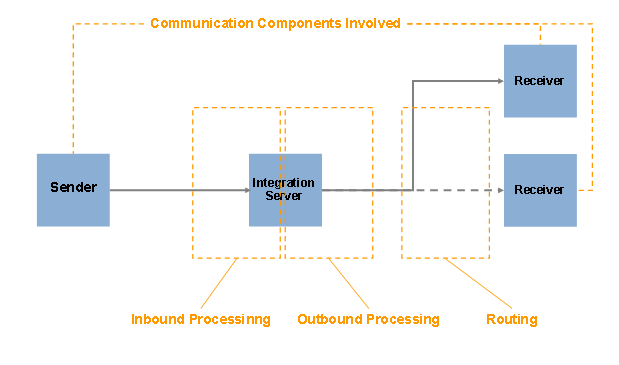
Message Processing Phases for a Simple System Landscape
To set up the process for a specific system landscape, specify the following in detail:
● The systems and parties involved and their technical communication possibilities
You define the systems involved in the process as communication components in the Integration Directory.
Create communication components of type Business System for those systems that you are familiar with (using the integration expert role). These are based on business systems that are described in the System Landscape Directory.
You can enter communication components of type Business Component (as representatives of the external system) for external systems of a business partner (business-to-business scenarios) that are not specified in greater detail. In addition to this, in business-to-business scenarios you can map the business partners and partner companies as communication parties.
If an executable integration process is used, this is also addressed as a communication component.
Define the available technical communication capabilities of the systems and parties that communicate with each other in communication channels.

The available technical communication capabilities are also called Connectivity and are realized in the various different Adapters.
More information: Defining a Collaboration Profile
● Inbound Processing of the message at the Integration Server
To specify which communication channel is to be used for the sender, define a Sender Agreement. You can also make security settings here.
More information: Defining Sender Agreements
● Outbound Processing of the message at the Integration Server
To specify which communication channel is to be used for forwarding the message to a specific receiver, define a Receiver Agreement. You can also make security settings here.
More information: Defining Receiver Agreements
● Routing
To specify which receiver a message from the Integration Server is to be forwarded, define a Receiver Determination. To specify receiver interfaces or mappings (if required), define an interface determination.
More information: Defining Logical Routing
The figure below illustrates how communication using the Integration Server functions, how the different configuration object types in the Integration Directory are related, and how they interact at runtime.
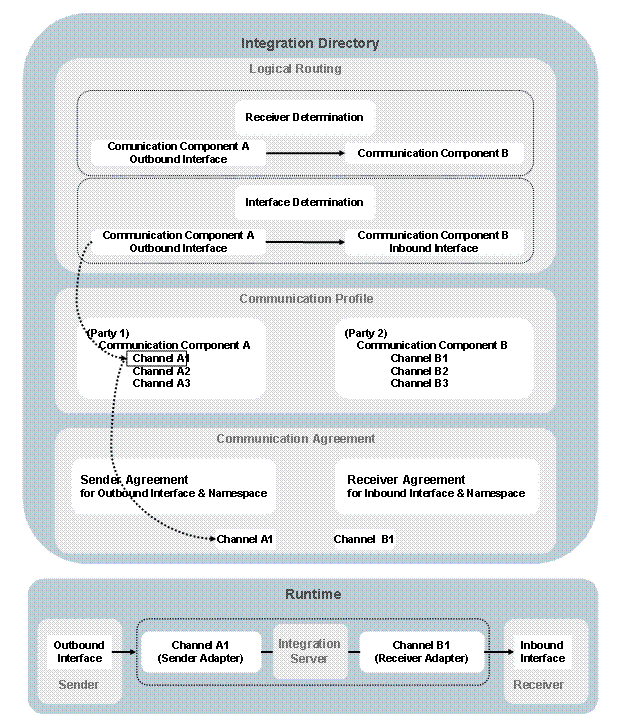
Interaction of Configuration Objects (Integration-Server Communication)
Configuration Objects for Direct Communication
In the special case of direct communication between two business systems that does not involve an Integration Server, define a direct connection.
More information: Defining Direct Connection.
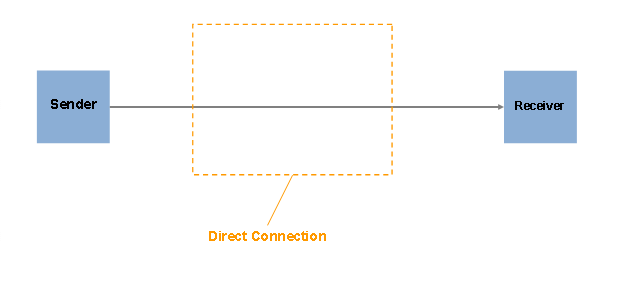
Direct Communication for Two Systems
Further Configuration Objects
To map different representations of entities to one another, use the value mapping function.
More information: Defining Value Mapping
You can use configuration scenarios or directories to group configuration objects together.
More information:
Defining Configuration Scenarios
Configuration objects are identified uniquely by an object key. In configuration objects, the object key is dependent on the object type.
More information: Object Key for Configuration Objects