
 Special Functions of the
Hierarchical-Sequential List
Special Functions of the
Hierarchical-Sequential List

Use
The hierarchical-sequential list allows you to combine two hierarchy levels such as header and position level in a display. To do this, specify two data tables that have the same data type in at least one column. You use this column to create a relationship between the two tables.

You are able to generate a maximum of five of such foreign key relationships.
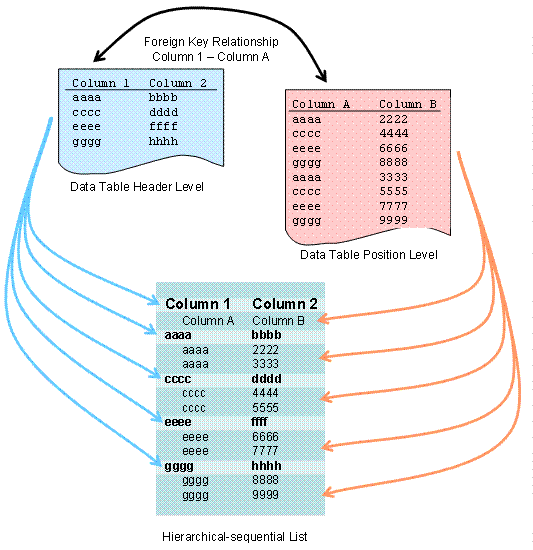
In the hierarchical-sequential list, you are able to use the following special functions.
· Determining Data Tables for the Header- and Position Level
· Linking Data Tables for the Header and Position Level
· Displaying or Hiding Position Rows
You use most of the functions of the hierarchical-sequential list analog to the simple, two-dimensional table (such as aggregation, sorting, filter). Here you also have to specify for which of the hierarchy levels you want to execute the function.
Features
Linking Data Tables for the Header and Position Level
You are able to link the two internal data tables of the hierarchical-sequential list with up to five foreign-key relationships.
Methods
Function |
Class |
Method |
Link data tables |
CL_SALV_HIERSEQ_ |
FACTORY |
SET_DATA |
||
Get foreign key relationships |
CL_SALV_HIERSEQ_ |
GET_BINDING |
Displaying or Hiding Position Rows
By default, users cannot hide the position rows of a hierarchical-sequential list: there are no symbols to enable this function.
You are able to define a column from the header level as an expansion column. This has the following effects:
· You are able to hide or display the position rows of a specific header row using the contents of this expansion column.
· A symbol is displayed in each header row that the user can click to manually hide or display the associated position rows.
· You are able to hide or display the position rows for all header rows simultaneously with your application.
Methods
Function |
Class |
Method |
Define a column on the header level as expansion column |
CL_SALV_COLUMNS_ |
SET_EXPAND_COLUMN |
Get current expansion column |
GET_EXPAND_COLUMN |
|
Hide position rows for all header rows |
CL_SALV_HIERSEQ_ |
SET_ITEMS_EXPANDED |
Get current status of position rows |
IS_ITEMS_EXPANDED |