
 Getting and Modifying Subobjects of a
Main Class
Getting and Modifying Subobjects of a
Main Class

Purpose
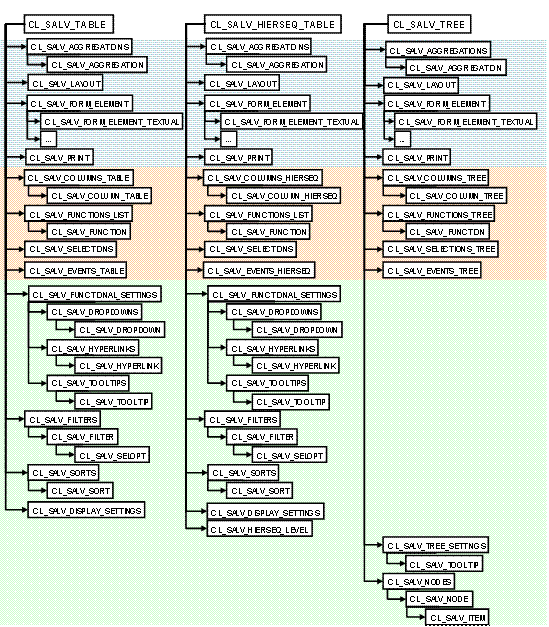
The ALV object model includes a large number of classes that you can use to make specific settings. The following graphic compares the class diagram of the three main ALV classes.
Naming Conventions
The classes of the ALV object model are structured that you can usually tell from the names which areas of the ALV output you can change with the methods from these classes.
·
Singular or
plural
Often you will find class names that exist in both plural and in singular
(such as CL_SALV_COLUMN and CL_SALV_COLUMNS). You can see from the names that
in the one class there are methods that only affect a specific object and in
the other class the methods are for all of these objects.
·
ALV tool
Many functions are available for all three ALV tools. However, when there are
differences between the classes of the ALV tools, you can find the right
variant by the name (such as CL_SALV_COLUMN_TABLE, _SALV_COLUMN_HIERSEQ,
CL_SALV_COLUMN_TREE)
Get Subobjects
You get the objects for these classes using the Get methods of the three main ALV classes. The following table shows which methods in the main ALV classes provide which subobjects:
Methods of Main ALV Classes to Get Subobjects
Method |
Returns Object of Type |
Remarks |
GET_AGGREGATIONS |
CL_SALV_AGGREGATIONS |
|
GET_COLUMNS |
CL_SALV_COLUMNS_TABLE or CL_SALV_COLUMNS_HIERSEQ or CL_SALV_COLUMNS_TREE |
|
GET_DISPLAY_SETTINGS |
CL_SALV_DISPLAY_SETTINGS |
Not in CL_SALV_TREE |
GET_EVENT |
CL_SALV_EVENTS_TABLE or CL_SALV_EVENTS_HIERSEQ or CL_SALV_EVENTS_TREE |
|
GET_FILTERS |
CL_SALV_FILTERS |
Not in CL_SALV_TREE |
GET_FUNCTIONAL_SETTINGS |
CL_SALV_FUNCTIONAL_SETTINGS |
Not in CL_SALV_TREE |
GET_FUNCTIONS |
CL_SALV_FUNCTIONS_LIST |
Not in CL_SALV_TREE |
CL_SALV_FUNCTIONS_TREE |
Only in CL_SALV_TREE |
|
GET_LAYOUT |
CL_SALV_LAYOUT |
|
GET_LEVEL |
CL_SALV_HIERSEQ_LEVEL |
Only in CL_SALV_HIERSEQ_TABLE |
GET_NODES |
CL_SALV_NODES |
Only in CL_SALV_TREE |
GET_PRINT |
CL_SALV_PRINT |
|
GET_SELECTIONS |
CL_SALV_SELECTIONS |
Not in CL_SALV_TREE |
CL_SALV_SELECTIONS_TREE |
Only in CL_SALV_TREE |
|
GET_SORTS |
CL_SALV_SORTS |
Not in CL_SALV_TREE |
GET_TREE_SETTINGS |
CL_SALV_TREE_SETTINGS |
Only in CL_SALV_TREE |
If one of the classes uses another class, you can also get its objects using the Get methods.
Class Used |
Includes Get method |
Returns Object of Type |
CL_SALV_AGGREGATIONS |
GET_AGGREGATION |
CL_SALV_AGGREGATION |
CL_SALV_COLUMNS_TABLE |
GET_COLUMN |
CL_SALV_COLUMN |
CL_SALV_COLUMNS_HIERSEQ |
||
CL_SALV_COLUMNS_TREE |
||
CL_SALV _FUNCTIONAL_SETTINGS |
GET_DROPDOWNS |
CL_SALV_DROPDOWNS |
GET_HYPERLINKS |
CL_SALV_HYPERLINKS |
|
GET_TOOLTIPS |
CL_SALV_TOOLTIPS |
|
CL_SALV_FUNCTIONS_LIST |
GET_FUNCTIONS |
CL_SALV_FUNCTION |
CL_SALV_FUNCTIONS_TREE |
||
CL_SALV_FILTERS |
GET_FILTER |
CL_SALV_FILTER |
CL_SALV_NODES |
GET_NODE |
CL_SALV_NODE |
CL_SALV_SORTS |
GET_SORTS |
CL_SALV_SORT |
Process Flow
If you have created the internal data table and the instance of the ALV main class, you are able to generate an object for each class used and make the settings as well. To do this, proceed as follows:
·
You declare
an object variable for each type of class that you want to use
(such as data: gr_display type ref to cl_salv_display_settings.
)
·
You use the
respective Get method the main ALV class to get the objects of the
corresponding type
(for example gr_display = gr_table->get_display_settings ( ).
)
·
You use the
methods of the class used to assign the desired properties to the object.
(For example
gr_display->set_striped_pattern(
value = 'X').
gr_display->set_vertical_lines(
value = 'X').)
When you have made the settings you display the ALV output with the display method.