
 Criteria Manager
Definition
A tool that allows you to define conditions and criteria for raised events and to combine them into complex dependencies so as to instruct the event history which of all the raised events to log. You define conditions for events as a combination of standard ABAP select options. You combine these conditions as logical expressions with the logical operators OR and AND.
To access the Criteria Manager, in Event History (transaction SM62), choose the Criteria tab.
Structure
You create and combine criteria in a criteria hierarchy. The criteria hierarchy is the set of all the criteria which the raised events need to fulfill so they are logged in the event history. The criteria in the hierarchy may be grouped in nodes that are governed by a logical AND or OR relation as shown in the figure below:
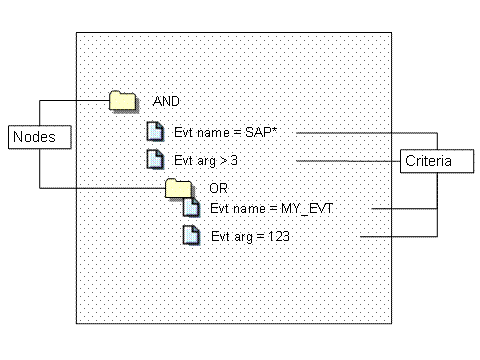
A criteria hierarchy is stored in a criteria profile which can be active and inactive. For the criteria in a profile to take effect, the profile has to be active. You can have many profiles, but only one can be active.
For more information about building a criteria hierarchy, see Building a Criteria Hierarchy.
Criteria and Nodes
A criteria hierarchy comprises the following:
● Criteria
The smallest unit in the criteria hierarchy that contains the conditions which an event must fulfill.
You set separate conditions for event names and for event arguments. You can set conditions, such as exact values or relative values, for example event name equals MY_EVENT, or, event argument is greater than 3. You can also set wildcard values (*), as well as exclude and include value ranges.
A criteria hierarchy needs to contain at least one criterion.
● Node
A group of criteria governed either by an AND relation, or by an OR relation. When building a criteria hierarchy, you can group individual criteria in nodes.
A node can be of one of two types: an AND or an OR node. The type of the node determines the logical relation between the criteria in the node:
○ AND node
The criteria in the node is governed by a logical AND relation (all the criteria must be fulfilled). You group criteria in an AND node when you want all the criteria in the node to be fulfilled for the event to be logged in the event history.

An AND node contains the following criteria:
<AND>
Event name = MY_EVENT
Event argument > 3
Event history logs all events with an event name equal to MY_EVENT and an event argument greater than 3.
○ OR node
The criteria in the node is governed by a logical OR relation (at least one of the criteria must be fulfilled).
You group criteria in an OR node when you want at least one of the criteria in the node to be fulfilled for the event to be logged in event history.
An OR node contains the following criteria:
<OR>
Event name = MY_EVENT
Event argument = 3*
Event history logs all events which match at least one of the criteria, that is, all events with name MY_EVENT (regardless of the argument) as well as all events with an argument starting with 3 (regardless of the event name).
Nodes can be nested in other nodes. For example, you can create an OR node which is a sub-node of an AND node.
By default, the Criteria Manager creates a top level AND node in a criteria hierarchy. All nodes you create are nested in this parent node. The criteria in this top level node are governed by an AND relation.

If a nested node contains just one criterion, this criterion is not governed by the relationship imposed by this nested node. The criterion is governed by the relationship of the parent of the nested node.
For example, the criteria hierarchy has the graphical representation as shown in the figure below:
AND Criterion 1 [EVENTID=MY_EVENT_1] OR Criterion 2 [EVENTPARM>123] |
In this case, the event history will log the events with event name equal to MY_EVENT_1 and with event argument greater than 123 (both conditions must fulfilled). It will not log events for which at least one condition is fulfilled, that is, either the event name is equal to MY_EVENT_1, or the event the argument is greater than 123.
Example
You want event history to log all events with event name MY_EVENT_1 and event argument greater than 123. You also want event history to log all events with event name starting with ABC and event argument equal to 123.
For an example about building a criteria hierarchy for event history to log only the events that fulfill these criteria, see Example: Creating a Criteria Hierarchy.
See also: