 Configuring the NWDI User Management
The user management for the SAP NetWeaver Development Infrastructure (NWDI) with Design Time Repository (DTR), Change Management Service (CMS) and Component Build Service (CBS) uses the User Management Engine (UME). The UME provides different ways of storing user data.
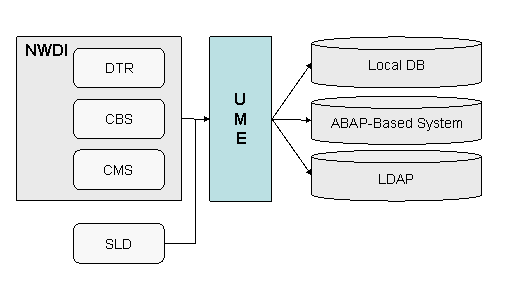
How the NWDI uses UME
To use the UME, you have to select a storage location for the user data.
Storing User Data in the Local Database of an AS Java
You can use the groups NWDI.Developer and NWDI.Administrators to grant the relevant permissions. You also need a user for the CMS. The CMS uses this user to perform all actions in the DTR, CBS, and SLD that are required for the configuration of the NWDI and the CMS itself.
 Recommendation
We recommend that you call this user NWDI_CMSADM. It must be assigned to the NWDI.Administrators group.
Storing User Data in an ABAP-Based System
If the users are imported from a central ABAP-based system, you do not have to create them in the user administration front end of the AS Java.
For more information, see User Management of Application Server ABAP as Data Source.
Storing User Data in an LDAP System
You can also store user data in an LDAP system. See LDAP Directory as Data Source.
 Note
Note
In LDAP systems, names of users and groups are unique only in the context of the hierarchy. As a basis for assigning authorizations in the DTR, the name alone is therefore not sufficient. For this reason, a concept for unique IDs exists, which are used in the DTR in place of the names.
Required Roles and Actions
The table below shows the minimum requirements concerning roles and actions for the development with the NWDI. The role and group names are examples.
Roles and Actions Required for the Development with NWDI
UME Group |
UME Role |
UME Action |
|---|---|---|
NWDI.Administrators |
SAP_DI_Administrator |
CBS.Administrator CMS.Administrate |
NWDI.Developers |
SAP_DI_Developer |
CBS.Developer CMS.Display CMS.ExportOwn |
Note
To allow communication with the SLD, you must additionally assign the UME roles SAP_SLD_ORGANIZER to the group NWDI.Administrators and SAP_SLD_DEVELOPER to the group NWDI.Developers.
More Information
Roles in the Change Management Service and Roles in the Component Build Service - information about other authorizations that are not in the category Administrator or Developer (such as Quality Manager).
Authorizations in Design Time Repository - information about the permissions needed to access to specific workspaces and resources in the DTR.
Assigning Roles to Users and Groups - for an example how to assign user groups to UME roles.