 Configuring SSO in NWDI Landscapes
You can use the configuration template DI landscape SSO configuration of the SAP NetWeaver Development Infrastructure (NWDI or DI) for configuring the Single Sign-On (SSO) environment in your landscape. The configuration template uses the Change Management Service (CMS) as central information provider for the whole NWDI landscape. The development track is used as operation unit for SSO configuration, which contains CBS, CMS, DTR, SLD and (optionally) Serverside Development Infrastructure Client (SDIC) server. All NWDI server information can be retrieved from CMS, except system administrator user dada, which are needed for execution of SSO configuration. You can use this configuration template also for configuring SSO in a self-defined DI landscape.
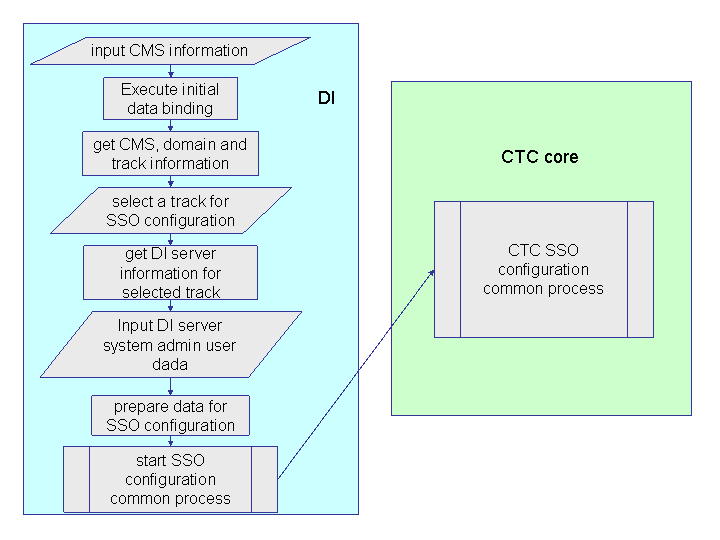
DI SSO configuration process flow
Procedure
Open the SAP NetWeaver Administrator tool and log on as an administrator. Navigate to the configuration templates tab page.
Choose
 Configuration Management
  Scenarios Configuration
Wizard
Scenarios Configuration
Wizard 
Select the task DI landscape SSO configuration and choose Start pushbutton.
Specify the CMS URL. Specify the name and password of the administrator user of the CMS. Choose Next pushbutton.
From the drop-down list choose the development track you want to configure SSO for. Choose Next pushbutton.
Specify the information about the NWDI servers in the landscape. If you are using SDIC in the landscape, activate the Is a SDIC server used for this DI landscape? checkbox and specify the SDIC settings too.
 Note
NoteUse full qualified host names when filling in the required information in this step of the dialog.
End of the note.When ready, choose Next pushbutton.
Verifying SSO configuration
You can view and verify if the SSO connection was properly configured in the SAP NetWeaver Administrator tool under Configuration Management Trusted Systems . For more information, see Configuring
the AS Java to Accept Logon Tickets.