
 Technical System Landscape

PDF-based Forms in ABAP Environment and Interactive Forms in Web Dynpro for ABAP
PDF-based forms created in the ABAP Workbench and forms created in Web Dynpro for ABAP use the Adobe document services for processing. The figure below gives you an overview of the communication paths.
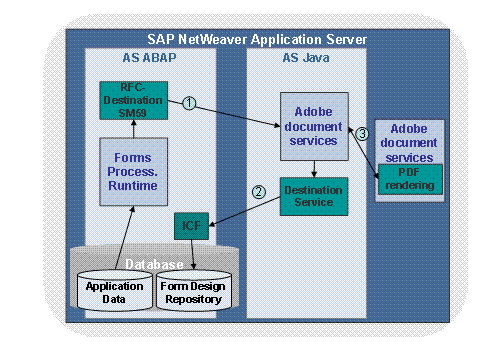
Communication path 1:
...
The Forms Processing Runtime sends the application data of the form and a link to the form design (template of the form) to the Adobe document services using SOAP, through the RFC destination (SM59).
Communication path 2:
Before processing the form and creating a PDF file, the Adobe document services calls the form design, which is stored in the Form Design Repository of the AS ABAP. Thus the Destination Service communicates with the Internet Communication Framework (ICF).

The protocol for both communication paths is HTTP using the default HTTP port. In the case of SSL, it is HTTPS, respectively HTTPS-Port.

You must configure SSL on both communication path 1 and path 2, if your scenarios use digital signatures and certification.
Communication path 3:
The Adobe document services are installed on the AS Java and consist of two parts. The communication between these parts uses the IIOP service (IIOP port). In case of SSL it is the IIOP SSL port of the AS Java. You only need to configure SSL on this communication path if your scenarios require a high level of security.
If you configure IIOP SSL, you also have to download and deploy the Binaries SSL-2 Library. This library contains strong encryption. You may need authorization to receive this library. For more information, see SAP Note 752153.
To configure SSL you have to make settings in the User Management and in Communication Destinations.
Interactive Forms in Web Dynpro for Java
Interactive forms created with Web Dynpro in the SAP NetWeaver Developer Studio communicate with the Adobe document services for processing. The figure below gives you an overview of the communication paths.
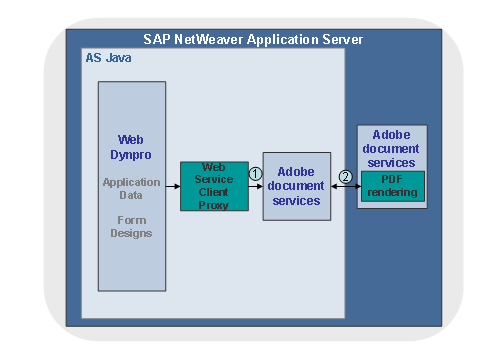
Communication path 1:
Communication between Web Dynpro and the Adobe document services uses a Web Service.
You must set the Web Service Client Proxy as an SSL connection, if your scenarios use digital signatures and certification.
Communication path 2:
The Adobe document services are installed on the AS Java and consist of two parts. The communication between these parts uses the IIOP service (IIOP port). In case of SSL it is the IIOP SSL port of the AS Java. You only need to configure SSL on this communication path if your scenarios require a high level of security.
If you configure IIOP SSL, you also have to download and deploy the Binaries SSL-2 Library. This library contains strong encryption. You may need authorization to receive this library. For more information, see SAP Note 752153.
See also:
 Configuration of the
Web Service SSL Connection in the Adobe Document Services Configuration
Guide.
Configuration of the
Web Service SSL Connection in the Adobe Document Services Configuration
Guide.