Eventing for UI Element SilverlightIsland
Starting point is the example of a bar chart described in Data Transfer for UI Element SilverlightIsland . An event is to be added to this example; this event is triggered by Microsoft Silverlight and processed by Web Dynpro ABAP.
The XAP file used in the data transfer example is used again here. The code to trigger the Selection event is within the Microsoft Silverlight application.

Clicking the bar chart in Microsoft Silverlight triggers an event that passes the selected flight and calculated occupancy as parameters to the Web Dynpro application. The event is named Selection and has the parameters occupancy (float) and flight (string).
-
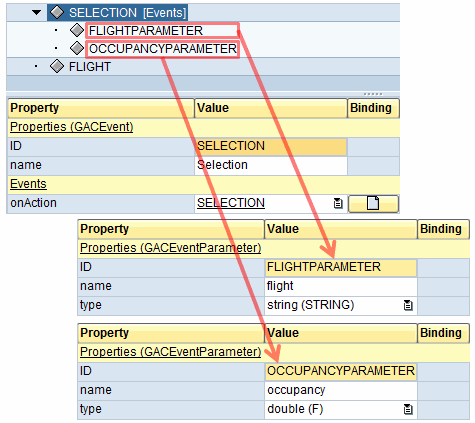
In the Web Dynpro application, aggregate a GACEvent for the SilverlightIsland UI element.
-
The following properties of the GACEvent must be assigned values:
-
Name: Selection
CautionMake sure the names are the same.
-
onAction: A Web Dynpro action for event handling
-
-
For this GACEvent, aggregate GACEventParameter , whose name property matches the name in SilverlightIsland ( occupancy and flight) and whose type property matches the expected type ( occupancy as a float and flight as a string variable).
NoteYou can enter any ID for the UI element since the ID is evaluated neither by the Web Dynpro application nor by Silverlight.
-
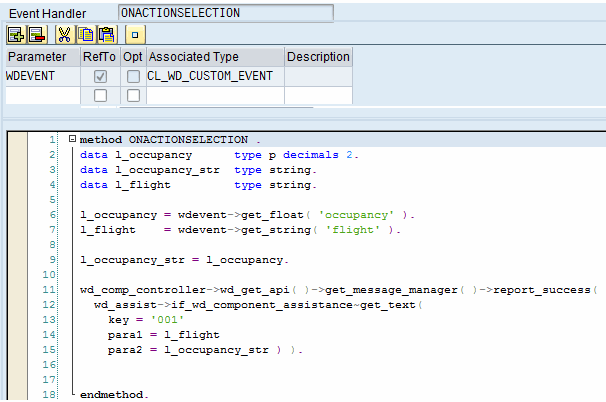
You can get the parameters in Web Dynpro in the action handler method for WDEvent by using one of the following methods depending on the data type:
-
WDEVENT->GET_BYTE
-
WDEVENT->GET_CHAR
-
WDEVENT->GET_DATA
-
WDEVENT->GET_FLOAT
-
WDEVENT->GET_INT
-
WDEVENT->GET_OBJECT
-
WDEVENT->GET_STRING
The methods to be used in the example are WDEVENT->GET_FLOAT for the occupancy attribute, and WDEVENT->GET_STRING for the flight attribute.
An example of this is:
-
-
Activate the component and the view, and start the application.
The example is available in the system in the Web Dynpro application DEMO_SILVERLIGHT_SEATS.