Data Transfer for UI Element SilverlightIsland
Data transfer with SilverlightIsland is described below by means of an example. The example uses a bar chart created in Microsoft Visual Studio. This bar chart is used to visually represent the occupancy rate of flight bookings. It provides information about the maximum capacity of a flight connection and how many seats are still available. The user can select a flight connection from a Table in the Web Dynpro application. The system then displays the occupancy rate for this flight connection.
The example is available in the system in the Web Dynpro application DEMO_SILVERLIGHT_SEATS.

The Silverlight project files (from Microsoft Visual Studio) for this example are available in a .zip file in the DEMO_SILVERLIGHT_SEATS folder in the MIME Repository.
The starting point in this example is an XAP file and information about this XAP file, such as which variables, lists, and actions are required.
The XAP file in the example uses an attribute with the name Flight and a data source Seats with the attributes SeatsOcc and SeatsMax.
Note that values are case-sensitive.
To enable the Microsoft Silverlight application to communicate with the Web Dynpro application, you need to make the Web Dynpro Island Library for Silverlight known to your project.
-
This involves making reference to the file WDSilverlightIslandLibrary.dll.
This file is stored in the MIME Repository under:
SAP/PUBLIC/BC/UR/nw7/SilverlightIslands/
Save this file so that you can access it easily, for example, in your computer's local file system.
-
Add this file in Microsoft Visual Studio under References .
-
In the Microsoft Silverlight C# code, import the library at those locations at which you want to program using Silverlight Islands.
In the following sample code, this is the using SAP; line.
-
To activate the data transfer to Web Dynpro, register the relevant components in the Microsoft Silverlight application by using a previously instantiated object of type Silverlight Island by means of the method register( <component_name>, <start_parameter>);.
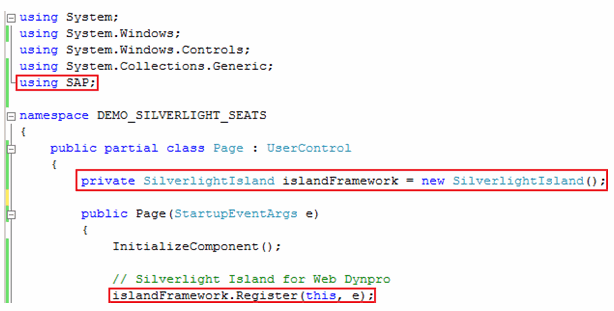
The sections of code relevant for enabling communication with Web Dynpro are highlighted in the example. The relevant attributes and data sources still need to be specified before the systems can communicate.
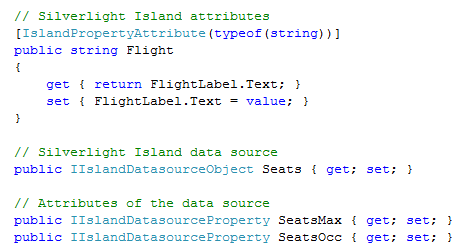
These variables are to be transferred as bound variables from the Web Dynpro application to the Silverlight Island and vice versa.
The following code is an example of access to an attribute in the data source:

-
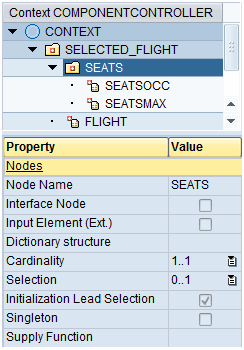
Your Web Dynpro application must have a context node that contains the FLIGHT attribute and the subnode SEATS with the following attributes:
-
SEATSOCC
-
SEATSMAX
An example of this is shown in the following figure:
-
-
This context node is to be filled before SilverlightIsland is called. You can use a supply function to do this, for example.
-
Specify the layout.
You need a separate Web Dynpro view for each XAP file, because a SilverlightIsland is always the RootUIElementContainer of a view, and you cannot change its source property during the lifespan of the view. Proceed as follows:
-
Switch to your view.
-
Change the type of RootUIElementContainer to SilverlightIsland by choosing Swap Root Element in the context menu.
-
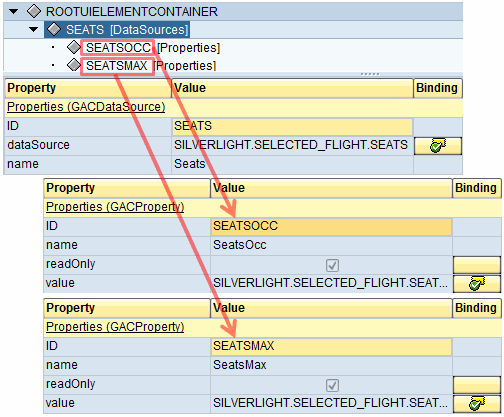
Since the XAP file requires one attribute and one data source with two attributes as outlined above, create a property ( GACProperties ) and assign it the name Flight. The ID of this property does not have an impact on Web Dynpro or Silverlight. It is used only by the developer. The properties that are important are name and value.
Bind the property to the context attribute FLIGHT.

Aggregate a GACDataSource , assign it the name Seats, and bind it to the context node SEATS. Create two properties for this data source: SeatsOcc, which you bind to the context attribute SEATSOCC, and SeatsMax, which you bind to the context attribute SEATSMAX.
This may look like:
 Caution
Always use the same names.
-
-
Import the XAP file into the MIME Repository.
If the XAP file is accessed by just one component, always save this file under this component. If the XAP file is to be accessed by multiple components, store it in a global folder in the MIME Repository.
When doing this, make sure the customer namespaces are correct.
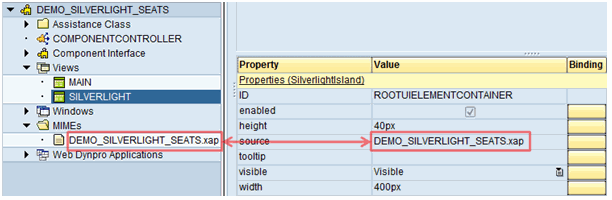
Enter the path to the relevant XAP file as the value for the source property of the SilverlightIsland:
-
Activate the component and the view, and start the application.
The application is displayed in the browser or in SAP NetWeaver Business Client, as shown in the example above.