Configuring the ECM Infrastructure (ECMI)
Context
Enterprise Content Management (ECM) is a technology for providing and managing unstructured content (such as documents) to support business processes in your company. You can use the ECM Infrastructure ( ECMI ) to make content from ECM systems available for SAP applications.
Configuration of Functional Units
To be able to use ECMI, you must activate the relevant functional units in the SAP system and provide the required repositories.
Overview
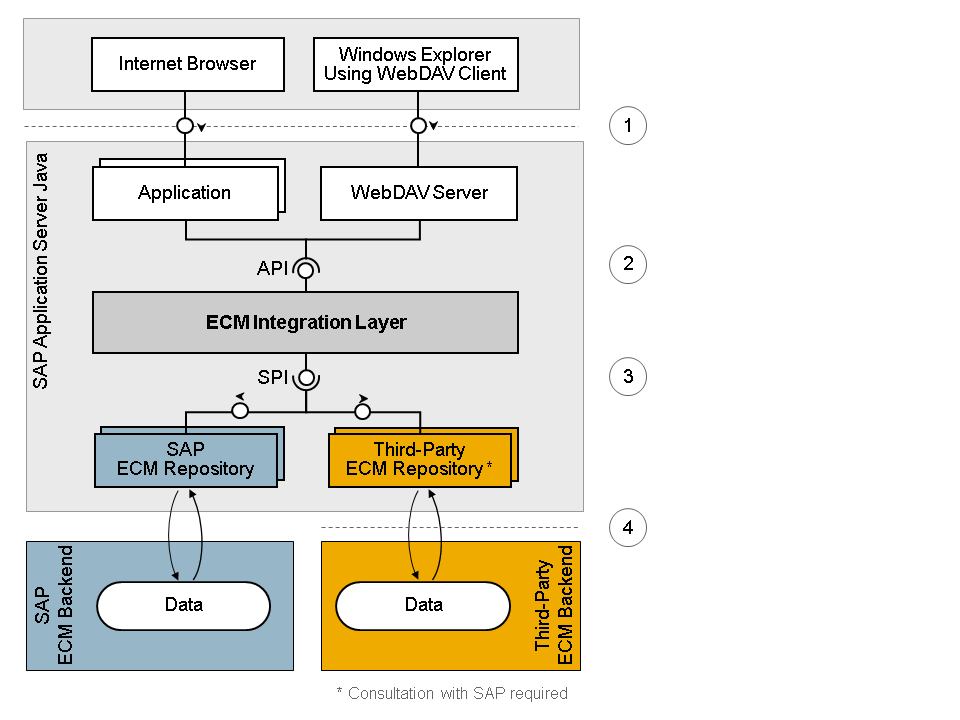
The following figure shows the structure of ECMI and how the ECM integration layer is used to access the data stored in the ECM back-end system.
|
Process Step |
Description |
|---|---|
|
(1) Generation of HTTP request |
When a user calls ECM content of an application (using the Internet browser or a local WebDAV client), the system generates an HTTP request. |
|
(2) API call |
The application calls the programming interface (API) of the ECM integration layer. The API call can be triggered by an HTTP request or by the application itself. |
|
(3) Connection to ECM back-end system |
To connect to an ECM back-end system, you need a connector that implements the service provider interface (SPI) of the ECM integration layer. For each connector, you can create one or more repositories as logical instances to be called directly. The data in the ECM back-end system is accessed using a repository. SAP provides a connector for the SAP ECM back-end system and a preconfigured repository as standard. |
|
(4) Access to data |
Users can access the data, in line with their repository authorizations. |
Procedure
- Proceed as follows (in the list of functional units):
-
Choose
 ECM Integration Core
  Enable Manually
  .Note
.NoteThis functional unit is represented by the installed software component ECM CORE COMPONENTS 7.30. The software component contains the runtime components of the ECM integration layer as well as its API and SPI.
To use the functional unit, you must use the API to establish the connection from your application to the ECM integration layer.
More information: SDN ( sdn.sap.com ), search term API documentation of the ECM integration layer
-
Choose
ECM Integration Services Enable Manually .NoteThis functional unit is represented by the following installed software components:
-
ECM APPLICATIONS 7.30 comprises the WebDAV server. You use it to manage the content of an ECM repository from Windows Explorer using a WebDAV client. You do not have to configure the WebDAV server.
-
ECM STORE 7.30 comprises the connector for the SAP ECM system and a preconfigured repository.
-
-