Group
The Group UI element is a UI element container and can be used to group multiple UI elements under one common title. The UI element looks like a display panel with a colored background.
The enabled property has no effect on the UI element children you inserted into the UIElementContainer. If, for example, you set the enabled property to false in the group UI element, an input field inserted in it is not automatically deactivated. If the UI element children in this group UI element are also to be deactivated, you must set the relevant property for each UI element separately.
Examples of the Display
Group with Primary Color
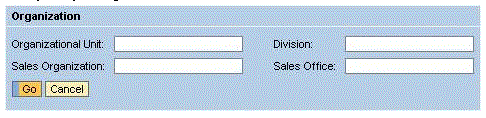
Group with Secondary Color and Tool Bar

Group with sapcolor
To enable the development of accessible applications, the accessibilityDescription property is checked during the syntax check if the caption property is not set.
The tooltip property is not checked.
A tooltip does not necessarily have to be set for this UI element, but it could make sense to set it if it contains detailed semantic information.
| Runtime Class |
CL_WD_GROUP |
Properties in View Designer
| Name | Type | Initial Value | Bindable |
|---|---|---|---|
|
STRING |
(automatic) |
No |
|
|
Translatable text |
Yes |
||
|
WDY_BOOLEAN |
false |
No |
|
|
WDUI_CONTEXT_MENU_BEHAVIOUR |
inherit |
No |
|
|
WDY_MD_UI_ELEMENT_REFERENCE |
No |
||
|
WDY_MD_UI_ELEMENT_REFERENCE |
Yes |
||
|
WDUI_GROUP_DESIGN |
primarycolor |
Yes |
|
|
WDY_BOOLEAN |
true |
Yes |
|
|
WDY_BOOLEAN |
false |
No |
|
|
WDY_BOOLEAN |
true |
Yes |
|
|
STRING |
Yes |
||
|
WDUI_SCROLLING_MODE |
none |
Yes |
|
|
Translatable text |
Yes |
||
|
WDUI_VISIBILITY |
visible |
Yes |
|
|
STRING |
Yes |
Aggregations in the View Designer
Other properties that can be inherited are defined in the related higher-level classes. The related UI elements are:
For dynamic programming, the same properties, events, and aggregations as in the View Designer are available. But note that the spelling format and use of upper/lower case is different.
Dynamic Programming of Properties
| View Designer Name | Runtime Name | Type |
|---|---|---|
|
ACCESSIBILITY_DESCR |
WDY_MD_TRANSLATABLE_TEXT |
|
|
ACTIVATE_ACCESS_KEY |
WDY_BOOLEAN |
|
|
CONTEXT_MENU_BEHAVIOUR |
WDUI_CONTEXT_MENU_BEHAVIOUR |
|
|
contextMenuBehaviour: inherit |
CL_WD_GROUP=>E_CONTEXT_MENU_BEHAVIOUR-INHERIT |
|
|
contextMenuBehaviour: provide |
CL_WD_GROUP=>E_CONTEXT_MENU_BEHAVIOUR-PROVIDE |
|
|
contextMenuBehaviour: suppress |
CL_WD_GROUP=>E_CONTEXT_MENU_BEHAVIOUR-SUPPRESS |
|
|
CONTEXT_MENU_ID |
WDY_MD_UI_ELEMENT_REFERENCE |
|
|
DEFAULT_BUTTON_ID |
WDY_MD_UI_ELEMENT_REFERENCE |
|
|
DESIGN |
WDUI_GROUP_DESIGN |
|
|
design: primarycolor |
CL_WD_GROUP=>E_DESIGN-PRIMARYCOLOR |
|
|
design: sapcolor |
CL_WD_GROUP=>E_DESIGN-SAPCOLOR |
|
|
design: secondarybox |
CL_WD_GROUP=>E_DESIGN-SECONDARYBOX |
|
|
design: secondaryboxcolor |
CL_WD_GROUP=>E_DESIGN-SECONDARYBOXCOLOR |
|
|
design: secondarycolor |
CL_WD_GROUP=>E_DESIGN-SECONDARYCOLOR |
|
|
design: underline |
CL_WD_GROUP=>E_DESIGN-UNDERLINE |
|
|
ENABLED |
WDY_BOOLEAN |
|
|
HANDLE_HOTKEYS |
WDY_BOOLEAN |
|
|
HAS_CONTENT_PADDING |
WDY_BOOLEAN |
|
|
HEIGHT |
STRING |
|
|
SCROLLING_MODE |
WDUI_SCROLLING_MODE |
|
|
scrollingMode: auto |
CL_WD_GROUP=>E_SCROLLING_MODE-AUTO |
|
|
scrollingMode: both |
CL_WD_GROUP=>E_SCROLLING_MODE-BOTH |
|
|
scrollingMode: none |
CL_WD_GROUP=>E_SCROLLING_MODE-NONE |
|
|
TOOLTIP |
WDY_MD_TRANSLATABLE_TEXT |
|
|
VISIBLE |
WDUI_VISIBILITY |
|
|
visible: none |
CL_WD_GROUP=>E_VISIBLE-NONE |
|
|
visible: visible |
CL_WD_GROUP=>E_VISIBLE-VISIBLE |
|
|
WIDTH |
STRING |
Dynamic Programming of Aggregations
You can find an example of this UI element in the system in the WDR_TEST_UI_ELEMENTS Web Dynpro application.