RadioButtonGroupByIndex
The RadioButtonGroupByIndex UI element can display a number of RadioButtons groups in columns and rows. Unlike UI element CheckBoxGroup, this UI element allows user to select one element only.
|
|
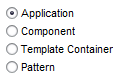
The two RadioButtonGroup UI elements RadioButtonGroupByIndex and RadioButtonGroupByKey do not differ from each other when displayed on the screen. However, the data binding model for the RadioButtonGroupByKey UI element has a completely different concept (see section Data Binding). The displayed texts are taken from the texts attribute, which is attached to a node with cardinality 0..n or 1..n.
Data Binding
The texts property must be bound to a context attribute that lies within a context node with the cardinality 0..n or 1..n. For each element of this node a RadioButton with the respective value of the texts attribute is displayed as a text.
More information :
Accessibility
To enable the development of accessible applications, the accessibilityDescription property is checked during the syntax check if the property tooltip is not set.
Implementation Details
|
Runtime Class |
CL_WD_RADIOBUTTON_GROUP_BY_IDX |
|
Name |
Type |
Initial Value |
Bindable |
|---|---|---|---|
|
STRING |
(automatic) |
No |
|
|
Translatable text |
Yes |
||
|
WDY_BOOLEAN |
false |
No |
|
|
I |
1 |
Yes |
|
|
WDUI_CONTEXT_MENU_BEHAVIOUR |
inherit |
No |
|
|
WDY_MD_UI_ELEMENT_REFERENCE |
No |
||
|
WDY_BOOLEAN |
true |
Yes |
|
|
Translatable text |
No |
||
|
WDY_BOOLEAN |
false |
Yes |
|
|
WDUI_LEAD_SEL_CHNG_BEHVR |
auto |
No |
|
|
WDUI_STATE |
normal |
Yes |
|
|
Translatable text |
Mandatory |
||
|
WDUI_TEXT_DIRECTION |
inherit |
Yes |
|
|
Translatable text |
Yes |
||
|
WDUI_VISIBILITY |
visible |
Yes |
|
|
STRING |
Yes |
|
Name |
Cardinality |
Type |
|---|---|---|
|
0..n |
|
Name |
|---|
Other properties that can be inherited are defined in the related higher-level classes. The related UI elements are:
Dynamic Programming
For dynamic programming, the same properties, events and aggregations are available as in the View Designer. But note that the spelling format and use of upper/lower case is different.
|
View Designer Name |
Runtime Name |
Type |
|---|---|---|
|
ACCESSIBILITY_DESCR |
WDY_MD_TRANSLATABLE_TEXT |
|
|
ACTIVATE_ACCESS_KEY |
WDY_BOOLEAN |
|
|
COL_COUNT |
I |
|
|
CONTEXT_MENU_BEHAVIOUR |
WDUI_CONTEXT_MENU_BEHAVIOUR |
|
|
contextMenuBehaviour: inherit |
CL_WD_RADIOBUTTON_GROUP_BY_IDX=>E_CONTEXT_MENU_BEHAVIOUR-INHERIT |
|
|
contextMenuBehaviour: provide |
CL_WD_RADIOBUTTON_GROUP_BY_IDX=>E_CONTEXT_MENU_BEHAVIOUR-PROVIDE |
|
|
contextMenuBehaviour: suppress |
CL_WD_RADIOBUTTON_GROUP_BY_IDX=>E_CONTEXT_MENU_BEHAVIOUR-SUPPRESS |
|
|
CONTEXT_MENU_ID |
WDY_MD_UI_ELEMENT_REFERENCE |
|
|
ENABLED |
WDY_BOOLEAN |
|
|
EXPLANATION |
WDY_MD_TRANSLATABLE_TEXT |
|
|
READ_ONLY |
WDY_BOOLEAN |
|
|
SELECTION_CHANGE_BEHAVIOUR |
WDUI_LEAD_SEL_CHNG_BEHVR |
|
|
selectionChangeBehaviour: auto |
CL_WD_RADIOBUTTON_GROUP_BY_IDX=>E_SELECTION_CHANGE_BEHAVIOUR-AUTO |
|
|
selectionChangeBehaviour: manual |
CL_WD_RADIOBUTTON_GROUP_BY_IDX=>E_SELECTION_CHANGE_BEHAVIOUR-MANUAL |
|
|
STATE |
WDUI_STATE |
|
|
state: normal |
CL_WD_RADIOBUTTON_GROUP_BY_IDX=>E_STATE-NORMAL |
|
|
state: required |
CL_WD_RADIOBUTTON_GROUP_BY_IDX=>E_STATE-REQUIRED |
|
|
TEXTS |
WDY_MD_TRANSLATABLE_TEXT |
|
|
TEXT_DIRECTION |
WDUI_TEXT_DIRECTION |
|
|
textDirection: inherit |
CL_WD_RADIOBUTTON_GROUP_BY_IDX=>E_TEXT_DIRECTION-INHERIT |
|
|
textDirection: ltr |
CL_WD_RADIOBUTTON_GROUP_BY_IDX=>E_TEXT_DIRECTION-LTR |
|
|
textDirection: rtl |
CL_WD_RADIOBUTTON_GROUP_BY_IDX=>E_TEXT_DIRECTION-RTL |
|
|
TOOLTIP |
WDY_MD_TRANSLATABLE_TEXT |
|
|
VISIBLE |
WDUI_VISIBILITY |
|
|
visible: none |
CL_WD_RADIOBUTTON_GROUP_BY_IDX=>E_VISIBLE-NONE |
|
|
visible: visible |
CL_WD_RADIOBUTTON_GROUP_BY_IDX=>E_VISIBLE-VISIBLE |
|
|
WIDTH |
STRING |
|
View Designer Name |
Runtime Name |
|---|---|
|
ON_SELECT |
|
View Designer Name |
Runtime Name |
Cardinality |
|---|---|---|
|
BUTTONS |
0..n |
For test purposes you can find examples of this interface element in the system in the Web Dynpro application WDR_TEST_UI_ELEMENTS, and in the component WDR_TEST_EVENTS in the RadiobtnGrpByIdx view.