Embedding ALV Views
The ALV component contains the following views:
-
TABLE
This is the central ALV view. To display the ALV display, you require this view.
The TABLE view is the container in which the ALV display is shown. It is a fundamental part of the ALV component. You cannot, therefore, change the layout.
-
SERVICE
This view contains the Settings dialog box with which the user can make changes to the settings for column display, sorting, filtering, and so on.
By default, the view is displayed above the ALV display when the user chooses the Settings hyperlink in the toolbar. You use this view when you want to display the dialog box in another position on the same window.
If you want to display the settings dialog in a window of your own then you can configure it using the ALV Configuration Model without having to include the SERVICE view specially.
For more information: Defining the Positioning of the Settings Dialog Box
-
CONTROL_VIEW
You cannot use this view, it is only for internal SAP use for implicit personalization.
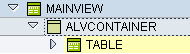
Include an ALV view in the TABLE example
You require the TABLE view if you want to display an ALV display in your application.
-
Add a UI element of type ViewContainerUIElement in the required position on one of your views.
-
Navigate to the window where this view is embedded and open the structure as far as the ViewContainerUIElement that was just created.
-
Select this element, open the context menu, and select Embed View .
-
Choose TABLE from the SALV_WD_TABLE component and confirm. The embedded view is now displayed in your window.