MenuRadioButton
This UI element makes a specific menu item available for the abstract MenuItem of a Menu in the form of a radio button.
Example of the Visual Display
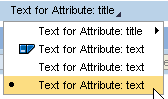
| Runtime Class |
CL_WD_MENU_RADIOBUTTON |
Properties in View Designer
| Name | Type | Initial Value | Bindable |
|---|---|---|---|
|
STRING |
(automatic) |
No |
|
|
WDY_BOOLEAN |
true |
Yes |
|
|
STRING |
Yes |
||
|
WDY_BOOLEAN |
false |
Yes |
|
|
STRING |
Mandatory |
||
|
Translatable text |
Yes |
||
|
WDUI_TEXT_DIRECTION |
inherit |
Yes |
|
|
WDY_BOOLEAN |
true |
Yes |
Events in View Designer
| Name |
|---|
Other properties that can be inherited are defined in the related higher-level classes. The related UI elements are:
For dynamic programming, the same properties, events, and aggregations as in the View Designer are available. But note that the spelling format and use of upper/lower case is different.
Dynamic Programming of Properties
| View Designer Name | Runtime Name | Type |
|---|---|---|
|
ENABLED |
WDY_BOOLEAN |
|
|
KEY_TO_SELECT |
STRING |
|
|
NEEDS_MORE_INFO |
WDY_BOOLEAN |
|
|
SELECTED_KEY |
STRING |
|
|
TEXT |
WDY_MD_TRANSLATABLE_TEXT |
|
|
TEXT_DIRECTION |
WDUI_TEXT_DIRECTION |
|
|
textDirection inherit |
CL_WD_MENU_RADIOBUTTON=>E_TEXT_DIRECTION-INHERIT |
|
|
textDirection ltr |
CL_WD_MENU_RADIOBUTTON=>E_TEXT_DIRECTION-LTR |
|
|
textDirection rtl |
CL_WD_MENU_RADIOBUTTON=>E_TEXT_DIRECTION-RTL |
|
|
VISIBLE |
WDY_BOOLEAN |
Dynamic Programming of Events
| View Designer Name | Runtime Name |
|---|---|
|
ON_SELECT |
There is a system example for this UI element in the DEMO_UIEL_MENU component in the DEMO_UIEL_MENUBAR application.