MenuRadioButton Properties
- enabled
Specifies whether or not an event can be triggered by a user interaction. If the value is TRUE, the view elements positioned above it are used at runtime to determine the value. This means that if the surrounding container is not enabled, all the containers within this are also not enabled.
In Web Dynpro ABAP "enabled" is always passed down from parent to child. If a UI element lies nested in another UI element that has enabled=FALSE, then this UI element has also enabled=false.
- keyToSelect
Value of the key used to select this MenuRadioButton.
- needsMoreInfo
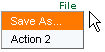
To execute the action defined for the MenuRadioButton additional information is required. To display this information another three points are listed after the text.
Example:
For a simple save, the following menu items are sufficient: File → SaveHowever, to save a file as a certain file type the user has to enter further details about the drive/directory, file name, and file type. The menu items for this are File → Save As..:
- selectedKey
Path to the context attribute that stores the selected key.
- text
Text located next to the MenuRadioButton.
This property can be personalized by an administrator.
- textDirection
Text or writing direction.
This enables labels of interface elements to be read in languages that have an RTL writing direction, such as Arabic or Hebrew, as opposed to LTR for languages like English.
This property can be personalized by an administrator.
Value Description INHERIT
The text direction is inherited from the parent element. Therefore, the text direction is identical to that of the parent element.
LTR
Left to right text direction
RTL
Right to left text direction