 Information System
Purpose
After you have completed your consolidation tasks, you may want create reports in order to evaluate data. This component comprises the various reporting functions. SAP supplies many standard reports that you can use, however, you can also create reports to meet you own individual requirements.
Features
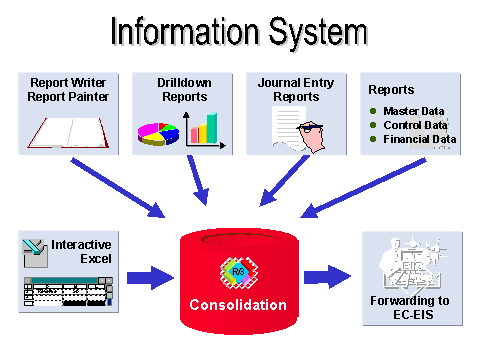
Master data, reported financial data, and control parameters form the basis of consolidation. You can use reports predefined by SAP to evaluate this data.
If you want to evaluate the changes to financial data as a result of consolidation entries, you can create journal entry reports .
You can use Report Writer or Report Painter reports and Drilldown Reporting to evaluate consolidated data in reports using different criteria, for example:
Reports for consolidation units
Period and fiscal year comparisons
Listing of data by posting level, subitem, and so on
You can also create detailed reports for the notes to your consolidated financial statements or for internal information, for example, an asset history sheet, a sales-by-region report, and so on.
To analyze data stored in the database, you can generate a database listing.
You can use the Interactive Excel component to evaluate consolidation data in reports using the standard spreadsheet functions of Microsoft Excel and a live connection to the SAP System or an Access database of the offline data entry program.
The following figure shows all of the parts of the Information System.
 ( )
( )