 Rollup to Consolidation Groups
Use
You can use this function to increase performance of Report Writer reports.
The use of this function is optional.
 Note
Note
The rollup discussed in this topic is not the same as the data transfer method "rollup" .
Prerequisites
To enable rollups to consolidation groups, you need to make the following settings in Customizing for Consolidation:
You define a task under
 Data
Data
 Rollup to Consolidation Groups: Define Task
 .
.
You assign this task to:
the task group for the data monitor, or
the task group for the consolidation monitor
.
Features
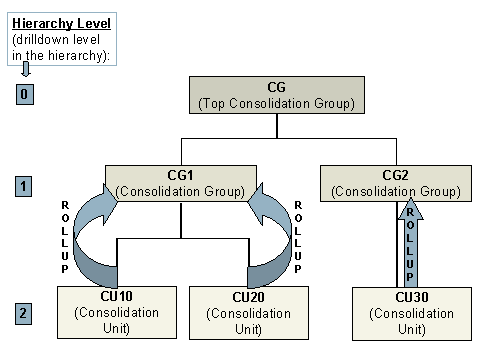
You can use a rollup to summarize and transfer the data of consolidation units to consolidation groups and consolidation group hierarchies. This provides faster access to the required data because the Report Writer reports no longer need to select data from the entire hierarchy, but rather only down to the specified hierarchy level.
Example: Rollup up to Hierarchy Level 1
 ( )
( )
The following functional restrictions exist when rolling up data to the rollup consolidation units of the consolidation groups:
The rollup produces useful results only for those consolidation groups, to which no individual consolidation unit has been assigned more than once (in lower-level consolidation groups). Due to the level-by-level rollups, the data of such a unit would be rolled up multiple times to the consolidation group – that is, once to each lower-level consolidation group to which the unit is assigned.
The system does not roll up additional field information to higher levels. Hence, these details get lost during a rollup.
Rollups ignore group-dependent data records that were created by the rollup program in preparation for consolidation group changes (posting levels 02, 12, 22 and 24).
Rollups do not recognize method changes for consolidation units that are assigned more than once within a hierarchy.
When the rollup is started directly in the menu, the rollup is considered a task in the consolidation monitor. Even if the rollup is also defined as a task in the data monitor, the system still rolls up all (rollup-capable) data records – including totals records with posting levels greater than 10.
Activities
You start a rollup and the Report Writer report as follows:
You start the rollup in the data monitor or the consolidation monitor.
In the report, restrict the selection to a certain drilldown level of the hierarchy (hierarchy level).
(In the example, this is hierarchy level 1 – see figure.)
Execute the Report Writer report.