 Data Transfer Method ‘Rollup’
Use
R ollup is a data transfer method with which you can transfer general ledger relevant business transactions periodically as reported data in Consolidation. You enter the business transactions in the operational SAP applications.
Rollup is the only possibility to transfer data from the operational SAP applications, when
operational data for profit center consolidations should be transferred
operational data should be transferred with the account assignment of the functional area (for example from the table GLFUNCT), in order to map the cost of sales accounting with the account assignment of the functional area.
operational data should be transferred from your own defined tables
Integration
This data transfer method concerns the rollup of the component special purpose ledger (FI-SL).
Features
 ( )
( )
Posting in Quantities
In the operational applications you set up the postings in the sender ledger. You can generate a rollup from any ledger. However the ledger totals table must contain the field, whose account assignments are necessary for Consolidation.
Rollup from the Sender Ledger
To transfer the data to Consolidation, you execute a rollup which selects the operational data in the sender ledger and converts it in the Consolidation totals table (ECMCT). The following activities are required for this:
You Define Rollup for Data Exports in the Implementation Guide (IMG) of Consolidation. A rollup is preset in the SAP standard system which you should use as a reference.
You execute the rollup via the task level menu of the component special purpose ledger (FI-SL).
Transfer of the Rollup Data
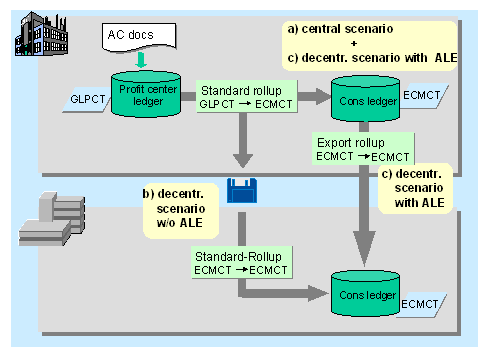
Update of the rolled data records in the consolidation processing ledger is dependent on the enterprise scenario.
Central scenario (same system, same client) as well as decentralized scenario with ALE
The system updates the rolled data records directly in the consolidation processing ledger.
Decentralized scenario (different systems or clients) without ALE
The standard rollup in the sender system (GLPCT → ECMCT) writes the data records to a file. For this you must enter the physical file name and link when executing the rollup in the parameter screen via Extras → Export File within the context of Output Data . Link and name can be up to a maximum of 30 characters.
The transfer of the file to the Consolidation system and to the Consolidation client is dependent on the condition of your system. For example the transfer can take place via access to the network.
In the Consolidation system / clients you require a standard rollup to apply the file, which roles from ECMCT to ECMCT. This rollup reads the file, checks the data and updates them in the consolidation processing ledger. The following activities are required for this:
You Define Rollup for Data Imports in the Implementation Guide (IMG) of Consolidation.
You execute the rollup in the task level menu of Consolidation either via the data monitor, or you choose Data → Reported Data → Rollup In the parameter screen you enter the physical file name and link via Extras → Export File within the context of Input Data .
 Note
Note
If required you can also use this procedure in a central scenario.
Decentralized scenario with ALE
As with the central scenario: The system updates the rolled data records directly in the consolidation processing ledger of the sender system.
To apply the data via ALE in the Consolidation system, you require an export rollup, which roles from ECMCT to ECMCT. Via ALE you update the data in the Consolidation system.
You will find more information in the IMG Special Purpose Ledger (FI-SL), section Tools → Distribution (ALE) .
Activities
You set the data transfer method Rollup in the IMG of Consolidation, section Settings in the Sender System .
 Caution
Before you must have executed all the preparations for consolidation steps so that the correct data is updated to the preparation for consolidation ledger and can be transferred to Consolidation.
 ( )
( )
When you want to execute a rollup from the consolidation staging ledger (Ledger 09), then note the following:
When you have set the data transfer method rollup in step Activate Data Transfer , then you can not execute the FI documents in the preparation for consolidation ledger in realtime. The realtime execution in the preparation for consolidation ledger only functions when you have set the Periodic Extract as data transfer method.
However you can set the data transfer method Rollup and post the FI documents subsequently and periodically in the consolidation staging ledger. You have to make sure here, that in the periods to be posted subsequently, no more current postings will take place. For posting subsequently, the step Tools for the Structure of the Initial Data Set → Post FI Documents is available. Afterwards you can execute the rollup from the preparation for consolidation ledger and apply it in the consolidation processing ledger.