 Assigning an Object to Classes
Use
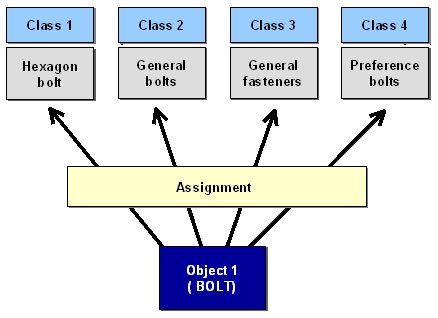
You can use this function to assign an object to one or more classes (multiple classification). The following graphic shows how an object (a bolt in this case) is assigned to several classes.
You can also classify an object from the object maintenance functions, where you can also assign the object to one or more classes (see: Classifying a Material (Example) ).
 ( )
( )
Procedure
To assign an object, such as a material, to one or more classes, using the classification functions:
In the Classification menu, choose
 Assignment
 Assign Object to Classes
.
Assign Object to Classes
.

Enter the object you want to classify. Select a class type.
Confirm your entries.
Enter the class or classes to which you want to assign your object. If the object already has assigned classes, choose
Edit
New assignments.
If you want to assign values to characteristics, position the cursor on a class. Double-click on the class or select
 ( )
Values for assignments
.
( )
Values for assignments
.
You see a list of the characteristics of all the classes to which the object is assigned. This list is based on the user settings you made in
Extras
User settings
, on the
Values
tab.
Save your assignment(s).
See also: