 Rollup Examples
The following examples illustrate common settings for rollup.
The following examples assume operators work on SFC numbers one at a time. If operators work on multiple SFC numbers, the system divides SFC labor according to the setting of the Distribution of SFC Labor Time field in Labor Rule Maintenance. For more information, see Labor Rule Maintenance.
Example 1
Setup
Prerequisites:
On the Rollup Processing Rules tab page in Labor Rule Maintenance, you have set the Idle Factor for Labor Time field to Start to Complete.
You have created an indirect user LCC in Labor Charge Code (LCC) Maintenance named IDLE_TIME. This is the default user LCC for the operators in this example.
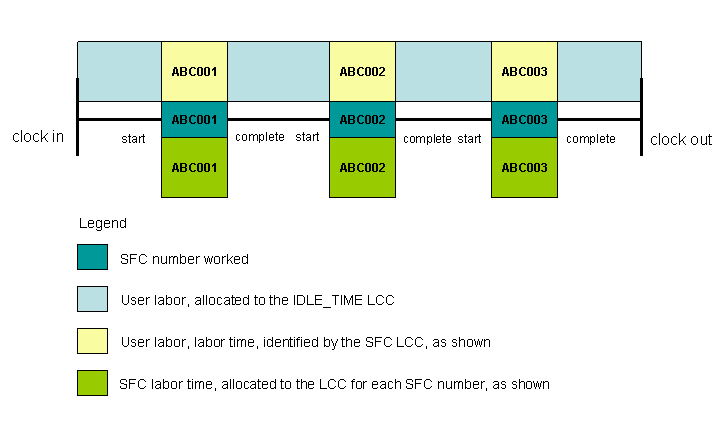
The figure below illustrates Example 1 and is followed by an explanation:
What Operators Do
Production operators clock in at the beginning of the shift, and the system starts charging their time against IDLE_TIME. At the workstation, the operator works one SFC number at a time in the POD. The operator clocks out at the end of the shift without changing his or her user LCC during the shift.
User Labor Results
If you selected the Enable User Labor Summarization checkbox on the Rollup Processing Rules tab in Labor Rule Maintenance, the system logs the following against the user’s default LCC, IDLE_TIME:
Time between clock in and the start of the first SFC number
Time between the completion of one SFC number and the start of another
Time between the completion of the last SFC number and clock out
The system logs the time between the start and completion of an SFC number against the respective SFC LCC. The system associates this time with the user.
SFC Labor Results
If you selected the Enable SFC Labor Summarization checkbox on the Rollup Processing Rules tab page in Labor Rule Maintenance, the system logs the time between the start and completion of each SFC number against the SFC LCCs.
Example 2
Setup
Prerequisites:
You have set the Idle Factor for Labor Time field to Start to Start on the Rollup Processing Rules tab page in Labor Rule Maintenance.
You have created an indirect user LCC in Labor Charge Code Maintenance named IDLE_TIME, and this is the default user LCC for the operators in this example.
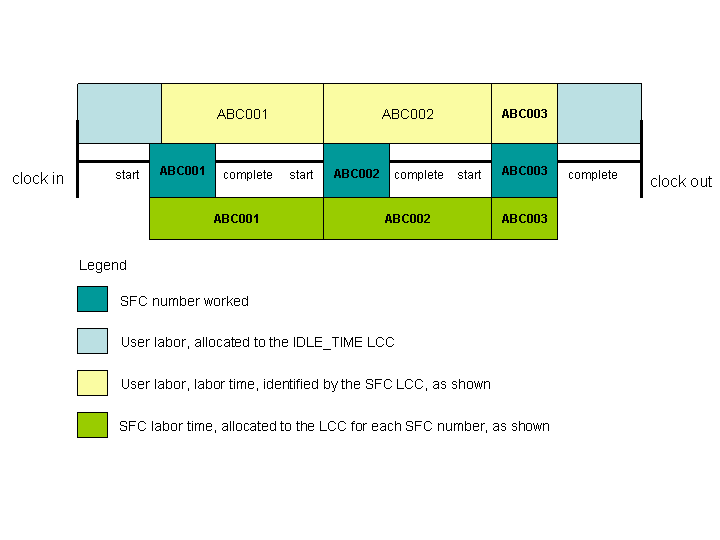
The figure below illustrates Example 2 and is followed by an explanation:
What Operators Do
A production operator clocks in at the beginning of the shift, and the system starts charging time against IDLE_TIME. At the workstation, the operator works one SFC number at a time in the POD. The operator clocks out at the end of the shift without changing the user LCC during the shift.
User Labor Results
If you selected the Enable User Labor Summarization checkbox on the Rollup Processing Rules tab page in Labor Rule Maintenance, the system logs the following against the user’s default LCC, IDLE_TIME:
The time between clock in and the start of the first SFC number
The time between the completion of the last SFC number and clock out
The system logs the time between the completion of one SFC number and the start of the next SFC number against the previous SFC LCC. The system associates this time with the user.
SFC Labor Results
If you selected the Enable SFC Labor Summarization checkbox on the Rollup Processing Rules tab page in Labor Rule Maintenance, the system logs the total time between the start of one SFC number and the start of the next SFC number against the first SFC LCC.
Example 3
Setup
Prerequisites
On the Rollup Processing Rules tab page in Labor Rule Maintenance, you have set the Idle Factor for Labor Time field to Start to Complete .
You have set up Labor Tracking with no clock in required.
You have selected the Enable SFC Labor Summarization checkbox, and cleared the Enable User Labor Summarization checkbox on the Rollup Processing Rules tab in Labor Rule Maintenance.
The figure below illustrates Example 3 and is followed by an explanation:

What Operators Do
Without clocking in or clocking out, a production operator works one SFC number at a time in the POD.
User Labor Results
Without clocking in or clocking out, the system does not count user labor results.
SFC Labor Results
The system logs the time between the start and completion of each SFC number against the SFC LCCs.