Quantity Check

Use
If the check of the part validity was successful, the system performs a quantity check in the overall configuration check. During the quantity check, the system performs the following steps:
...
1. For the comparison of the actual configuration and the allowed configuration, the system compiles all the objects into groups for each function identifier (FID) and identifies the respective objects for each FID group. Objects without an FID are combined in a No FID group.
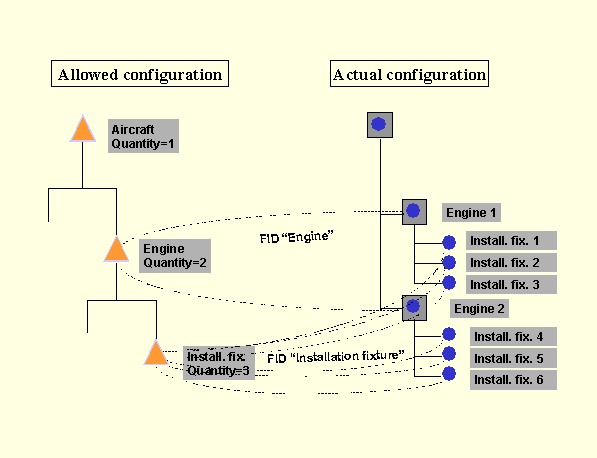
2. In the above example, the quantity check is for the “installation fixture” object. The FID and hence the corresponding iPPE structure node (example: “installation fixture”) are determined for the check of a particular object.
3. In the allowed configuration, quantities are saved depending on the next-highest structure level with lot size 1. Thus the structure nodes and the function identifier (FID) on the next-highest level are determined (example in the graphic: engine).
4. In the actual configuration the FID of the superordinate object is determined (example in the graphic: engine). The FID of this superordinate object must be identical with the previously determined superordinate structure nodes. Otherwise the part validity check fails and no quantity check is performed.
5. The equipment on the subordinate level is compiled by superordinate object (example in the graphic: installation fixture 1, installation fixture 2, and installation fixture 3 for engine 1, and installation fixture 4, installation fixture 5, and installation fixture 6 for engine 2.
6. The quantity of equipment in the subordinate groups is compared with the valid quantity that is defined for the relevant iPPE structure node (example in the graphic: There are three installation fixtures for each engine in the actual configuration; valid quantity of installation fixtures in the allowed configuration is equal to three. Thus the quantity check is successful).
The graphic contrasts the allowed configuration and the actual configuration and shows the quantity check.