 Multiple Routing Next Steps
Next Operator Decision
You can use multiple next steps when you want operators to decide where an SFC number goes next. For example, to avoid bottlenecks, you may use several operations that do the same task at a point on your routing.
The following figure depicts the routing, where the middle step can be performed by the AUTOPAINT
, PAINT
, or NEWPAINT
operation:
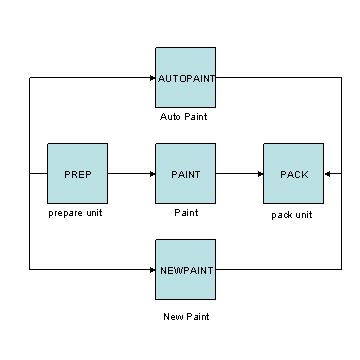
When the operator at the PREP operation completes an SFC number, the system displays a list with the following possible next steps:
New Paint
Paint
Auto Paint
The operator can select the step that is the least busy at the moment to process work in the most efficient way.
Any Order Groups
In addition to operations, you can use Any Order Group
operation. You first drag an Any Order Group
operation onto the drawing area in Routing Maintenance
, and then drag the operations you want to include in the group onto the Any Order Group
.
You use an Any Order Group
when you want a set of operations to be completed one at a time, but you do not want to impose a particular order on the operations. When you use an Any Order Group
, the system places SFC numbers in queue at all the operations in the group. Operators start and complete each operation one at a time.
When the operator at one of the operations in the group starts the SFC number, the system takes the SFC number out of queue at the other operations. When the operator completes the SFC number, the system places it back in queue at the other operations that have not been completed. After the SFC number has completed the last of the operations, the system places the SFC number in queue at the next operation on the routing.
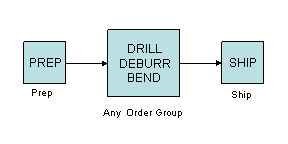
The middle step in the following routing is an example of an Any Order Group
. When the operator at the PREP
operation completes an SFC number, the system places the SFC number in queue at the DRILL
, DEBURR
, and BEND
operations. However, when the operator at the DEBURR
operation starts the SFC number, the system removes the SFC number from the Task
lists at the DRILL
and BEND
operations.
When the operator at the DEBURR
operation completes the SFC number, the system places the SFC number back in queue at the DRILL
and BEND
operations. When the operator at the BEND
operation starts the SFC number, the system removes the SFC number from the Task
list at the DRILL
operation.
When the operator at the BEND
operation completes the SFC number, the system places the SFC number back in queue at the DRILL
operation. When the operator at the DRILL
operation starts and completes the SFC number, the system places the SFC number in queue at the SHIP
operation. The following figure depicts the routing described:
Simultaneous Groups
You can use a Simultaneous Group
when you want a set of operations to be completed simultaneously (either independently of or dependently on one another) on an SFC number. You first drag a Simultaneous Group
operation onto the drawing area in Routing Maintenance
, and then drag the operations you want to include in the group onto the Simultaneous Group
.
Independent Steps
Independent steps allow work to be done simultaneously against an SFC number in any order. The following figure depicts the routing the middle step in which is an example of a Simultaneous Group
containing independent steps:

In the above example, after the operator completes the Prep
step, the system places the SFC number in queue at each of the steps in the Simultaneous Group
. In this case, the Electrical Test
, Mechanical Test
, Chemical Test
, and Impact Test
operations. Operators performing these operations can start and sign off the SFC number. The SFC number cannot move to the System Test
operation until all four operations within the Simultaneous Group
have been completed.
 Note
Note
If operators are working with a non-serialized SFC on a relaxed routing, a quantity of the SFC number moves to the System Test
operation when that quantity has been completed at all four operations within the Simultaneous Group
.
Dependent Steps
Dependent steps allow work to be done simultaneously against an SFC number but only in a particular sequence. The following graphic depicts the routing the middle step in which is an example of a Simultaneous Group
containing dependent steps:
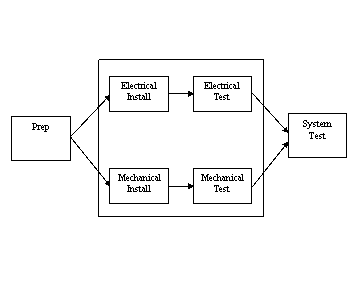
In the above example, after the operator completes the Prep
step, the system places the SFC number in queue at the Electrical Install
and Mechanical Install
operations of the Simultaneous Group
. The SFC number moves to the Electrical Test
operation only when the Electrical Install
operation is completed, which is independent of the Mechanical Install
and Mechanical Test
operations. The SFC number moves to the Mechanical Test
operation only when the Mechanical Install
operation is completed, which is independent of the Electrical Install
and Electrical Test
operations. The SFC number moves to the System Test
operation only when the Electrical Test
and Mechanical Test
operations are completed. For more information, see Creating Simultaneous Group with Dependent Steps.