 Changing Hierarchy Variants in the Fiscal Year
Use
Hierarchy variants are year-independent – you can therefore use the funds center hierarchies within them for several fiscal years. It is not possible to make any fiscal year-related changes to fund center hierarchies if you are working with year-dependent master data and have assigned a hierarchy variant for several fiscal years. Changes to the hierarchy variant are therefore valid for all years.
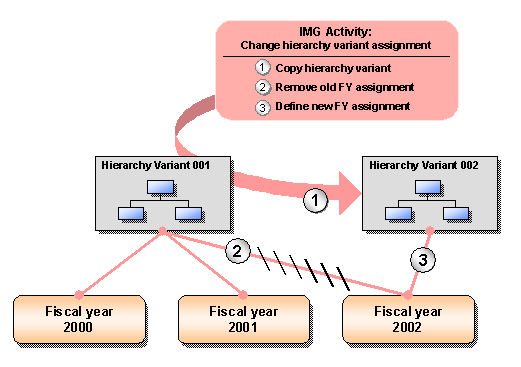
Using this program, it is possible to undo the assignment of a hierarchy variant for an FM area/fiscal year by replacing the assigned hierarchy variant with an identical copy. You separate fiscal years that were assigned to the same hierarchy variant when you do this.
You can also use the program to change the 4 digit hierarchy variant key to a 3 digit key. This is necessary if the assessment of funds centers should be carried out in the Business Information Warehouse (BW).
 Recommendation
If you need to change the funds center hierarchy of an assigned hierarchy variant, even if the relevant FM account assignments have already been posted, you can do this following a certain procedure.For more information, read Reorganizing Master Data .
Features
The program has the following two settings:
Delete Assignment
If the hierarchy variant is empty, that is, if it does not contain any funds centers, it is possible to delete the assignment for FM area/fiscal year.
 Note
Note
If the hierarchy already contains funds centers in which no postings have been made for each fiscal year, you can remove the funds centers from the hierarchy variant by changing the existence interval.
Replace Assignment
It is not possible to delete assignments if postings already exist for the relevant fiscal year. In this case, you can replace the hierarchy variant with another hierarchy variant provided that you use a new, empty hierarchy variant. In this process, all funds centers and their hierarchy variants are copied from the old hierarchy variant to the new hierarchy variant.
Year-Dependent Master Data: Change Assignment of Hierarchy Variant
Activities
Execute the program in Customizing, under
 Public Sector Management
  Funds Management Government Master Data Funds Center Hierarchy Variant ChangeAssignment of Hierarchy Variant
  .
.
For more information, see the program documentation.
See also: