 Determining Budget Object Elements: With Budget Objects
If you have defined budget objects in the budget structure , there are two ways of setting how the availability control (AVC) works:
Search for the first budget object
Here it is assumed that every element defined as a budget object has received budget. If a budget object has not received budget, availability control checks the posting against a zero budget. The system does not search for a budget object higher in the hierarchy for which budget was allocated, but triggers the appropriate actions as you defined them.
This is the function delivered in the standard system.
Search upwards within the hierarchy for the first budget object which has received budget .
To choose this function, make the appropriate setting in the IMG of Funds Management Government , under
 FormerBudgeting
 Availability Control Define Parameters for Availability Control.
Determining the Budget Object Element: Procedure with Budget Objects
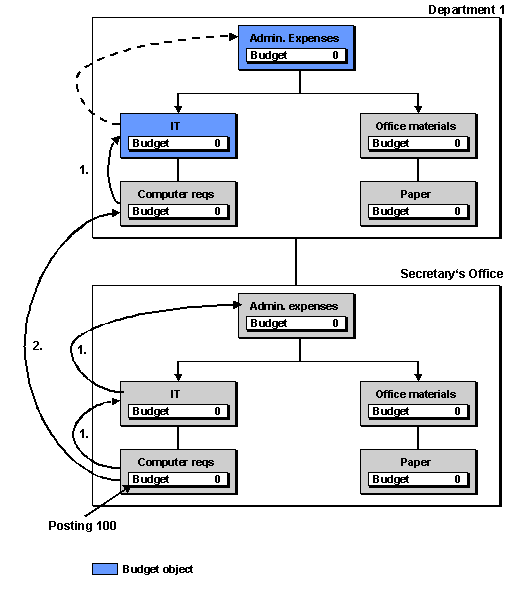
Starting from the funds center (secretary’s office) and commitment item (computer requirements) in the hierarchy, the AVC determines the first budget object in the following steps:
Within the funds center (secretary’s office), the higher commitment item (IT) in each case up to the top commitment item (administrative expenses).
In the funds center hierarchy, the next higher funds center (department 1) in each case, beginning with the assigned commitment item (computer requirements).
If you are working with the standard configuration, the AVC determines in the above example “ Department 1/IT ” as the budget object element. “Department 1/IT” is the lowest budget object.
If you have stipulate in Customizing that the AVC checks should be made in the first budget object with budget, the AVC searches up through the hierarchy until it finds the first budget object with budget. In the example above, the first budget object with budget is element “ Department 1/Administrative expenses ”.