 Budget Structure
Definition
In Former Budgeting, the budget structure represents all the funds centers and commitment items in hierarchical form for each fund.
Use
 Caution
Note that the BS functions mentioned here are intended for former budgeting. Information on the budget structure for the Budget Control System (BCS) can be found under Budget Structure in BCS .
You can select the necessary budget structure elements (BS elements) for your organization from the many combinations of fund centers and commitment items of a fund, then assign these to functions accordingly, to suit your needs for:
Central budget allocation or mixture of central and local budget allocation
Clarity in budgeting
By defining budget objects, the size of the budget hierarchy to be processed is usually substantially reduced.
Better system performance
The system only processes the budget objects and not the whole funds center and commitment item hierarchy .
Differentiating between budget level and assignment level
Year-Independent Master Data Maintenance
The budget structure is year-dependent and is therefore valid up until the time it has to be redefined due to new requirements. You define an individual budget structure that is year-independent for each fund if you are using overall values for this fund.
Year-Dependent Master Data Maintenance
You must create a new budget structure for each new fiscal year within the framework of year-dependent master data maintenance.
 Note
Note
You can copy the budget structure from the previous year to use as a template in the new fiscal year. For more information, see Maintaining Budget Structure .
Structure
Budget objects
Using budget objects you define the basic rules for budget allocation:
which BS elements can be budgeted
to which subordinate funds centers and commitment items is the budget to be distributed
NoteDefining the budget objects in the appropriate way enables central budget allocation or also a mixture of Central and Local Budget Allocation .
End of the note.
Posting objects
By using posting objects you specify which BS elements can be posted. The standard setting for Funds Management supports postings of actual/commitment for all revenue account assignments. If you want to define the Revenue Account Assignments as Posting Objects manually, you can do this in Customizing.
Assignment objects
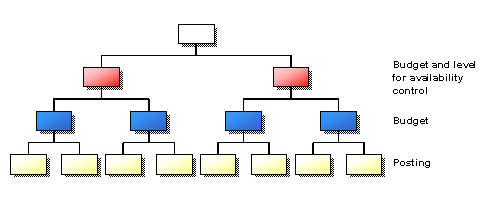
You define at which level the availability control checks against the budget.
 Recommendation
It only makes sense to define assignment objects if the assignment level is meant to be above the budget level.
Context of availability control and budget
Caution
If you are using Cover Pools for an FM area, you may not define assignment objects at the same time. A check is carried out on the BS by the system when you save and check a BS.
Integration
You can also use Budget Structure Templates to define budget structures.
See also: