Derivation Strategy for the Budgetary Ledger
Use
In order to derive the correct BL accounts from data related to a process in Funds Management, you must create a derivation strategy in Customizing that derives these fields.
Prerequisites
See Budgetary Ledger introductory information for prerequisites.
Procedure
Go to the Implementation Guide for Public Sector Management as follows
 : Funds Management Government
 Budgetary Ledger
Settings for General Budgetary Ledger Select Source Fields for Account Assignment Derivation
Budgetary Ledger
Settings for General Budgetary Ledger Select Source Fields for Account Assignment Derivation 
Select the source fields to be used for derivation and save your data.
Next, in the same menu path, access the IMG activity Define Derivation Strategy for BL Accounts .
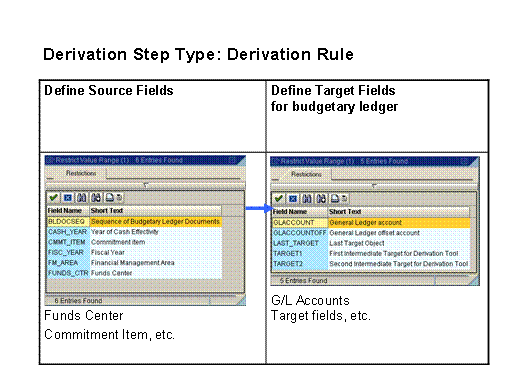
After specifying whether you want to customize the BL for budget postings or commitment/actual postings, create a new step of the type “derivation rule”.
Select the source fields and the target fields for the derivation of BL fields.
Save your data.
 Note
NoteIf you need to carry out automatic offsetting/deletion, see Special Processing for Multi-Annual Budgeting .
End of the note.
Result
The budgetary ledger has been set up and you can proceed to work with it.
Example
The example below shows the way that the budgetary ledger is normally customized so that the derivation tool is able to derive the correct fields for the BL.