 NC Code
A distinct set of characters that represents a failure, defect, or repair code indicating that the SFC number does not meet the approved product quality definition.
Using the Log Nonconformance
plug-ins or Web services, operators and machines log nonconformance codes to an SFC number.
If you have classifications of NC codes, you can create groups in NC Group Maintenance
.
Structure
NC codes belong to one of the following categories:
Failure
The SFC number does not comply with a product specification or quality definition.
Defect
A diagnosis of the quality defect. For example, the NC code
WIRE DAMAGE
indicates that a wire is damaged on the SFC number. The NC codeCON NOT SOLDER
indicates an unsoldered connection.Repair
The repair of the quality defect for an SFC number. For example, the NC codes
DONE
,LATER
, andANOP
indicate that the repair is complete, will be done later, or will be done by another operator.
For more information, see NC Code Maintenance and NC Code and Child Tables.
You can also create a hierarchy among NC codes to show their relationships to each other (see Creating NC Code Hierarchy). If you do not create a hierarchy for your NC codes, all three categories of NC codes have a flat relationship to each other as shown in the figure below:
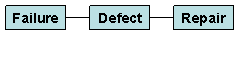
Default NC Code
The default NC code will be available in any NC code browse. Therefore, it is available for either the Log NC Reject
activity or existing NC clients. The DEFAULT_NC_CODE
activity rule for the Log NC Reject
activity
controls the behavior of the Log NC Reject
and the NC Code
field in NC clients. When the value is either required or optional, the new NC code called COMMENT
will be pre-loaded but can be changed as the NC code.
When the activity rule is NONE
, the system will automatically log the default NC code COMMENT
. This code will always have at least one data field called COMMENT
that will also be displayed upon entry into the
activity.
The LOG_FAILURE
and CLOSE_FAILURE
activity codes will be used for this new default NC code. Since only primary NC codes can be logged in the Log NC Reject
activity, these will typically be the activity
codes that will be specified. However, the existing activity codes for Log NC will continue to be available when using the Log NC
functionality.
The details of this NC code are the following:
Field Name |
Field Value |
|---|---|
|
|
|
Enter comment |
|
|
|
|
|
|
|
|
|
|
|
|
|
Empty |
|
|
|
|
|
Empty |
|
Checked |
|
Unchecked |
|
Checked |
|
Unchecked |
|
Unchecked |
Field Name |
Field Value |
|---|---|
|
Empty |
Field Name |
Field Value |
|---|---|
|
* |
|
Empty |
|
Checked |
Field Name |
Field Value |
|---|---|
|
Empty |
Field Name |
Field Value |
|---|---|
|
Empty |
For more information, see NC Code Maintenance.
Integration
SAP ME ERP Integration
If you use the SAPMEINT component, see Transfer of Nonconformance Data to Quality Notification.