
 Generating Entities from Database
Tables
Generating Entities from Database
Tables

Use
You use this procedure to generate entities from database tables.
Prerequisites
You have:
● Opened the Java Persistence perspective
More information:
 Java Persistence
Perspective
Java Persistence
Perspective
● Added persistence to your project
More information: Adding Persistence to Projects
● Created a connection to your database
More information: Creating Database Connections
Procedure
...
1. To generate entities from database tables, select your project in the Package Explorer.
2. Choose Java Persistence → Generate Entities from the context menu. The Generate Entities dialog opens.
3. Complete the Source Folder and Package fields:
● Source Folder: the folder to contain the java source files.
● Package: an arbitrary name of the package to contain the entities.
4. Choose the database tables to use to generate entities. Choose Finish.
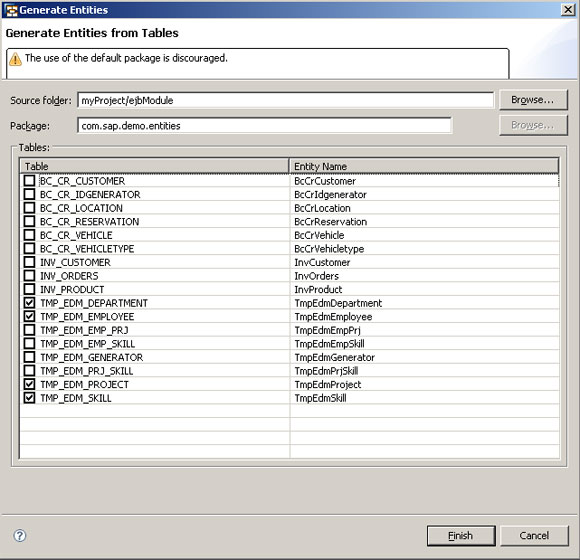
The Generate Entities Dialog
Result
The entities appear in the Package Explorer in the folder and package you have selected.

For best results, we recommend that you do manual post-processing of the entities generated using this procedure. The tools used for entities generation in this procedure are part of the open source DALI project, version 0.5, which has the following known limitations:
● Always generates primitive types (that is, there is no choice between primitive or wrapper types).
● There is no support for backward mapping of enumerations.
● Backward mapping of relationships relies on the existence of foreign keys in the database.
● @Lob annotation is not generated for LOB columns.