 Add User-Agent Steps
This document describes how to enhance the basic change request process with a user agent step. In the basic process, a change request is immediately activated after the requester submits the change request without further involvement of another user. In this enhanced process, a second user checks the change request in an additional user-agent step. If this user decides to approve the change request, the activation is started with change request step 91. Otherwise, the roll back of the change request is started with change request step 92. The other change request steps are not changed.
 Note
Note
The terms dialog step and user agent step are used as synonyms in MDG.
To enhance the basic process from the document Creating a Basic Change Request Process to the enhanced process described in this document, the new step 90 Final Check
with step type 2 Approve Change Request
is added. The user symbol next to the step type indicates that this is a user-agent step. The arrow from change request step 00 now points to the new change request step 90. The condition alias of this arrow was chosen as FC to abbreviate Final Check. The arrow, depicting that the user has accepted the change request with action 03, points to the change request step 91. The condition alias ACT
for the change request step 91 is added to the arrow. The arrow, depicting that the user has rejected the change request with action 04, points to the change request step 92. The condition alias RB
for the change request step 92 is added to the arrow.
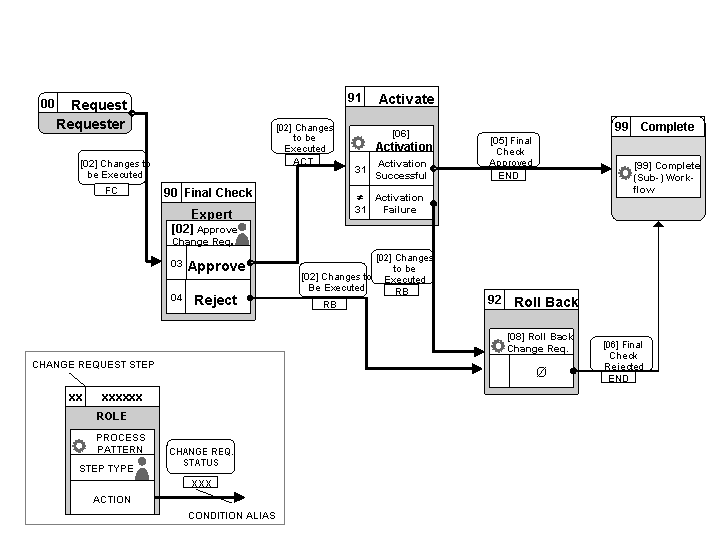
Change Request Process Including a User Agent Step
Prerequisites
You have configured the rule-based workflow for the basic change request process, as described in Creating a Basic Change Request Process. In the following example process, the change request type CR_TYPE
and the user FINAL_CHECK_USER
are used.
Process
You need to process the following steps in order to extend the basic workflow with a user step:
Create the new change request step.
The new change request step for the user dialog is defined in Customizing activity
Define Change Request Steps for Ruled-Based Workflow
under
General Settings

Process Modeling
Workflow
Ruled-Based Workflow
 .
.Workflow Step Numbers
Type of Chg. Request
CR Step
Keys
Validation
Description
CR_TYPE
90
n.a.
n.a.
Final Check
Adapt and add lines to decision tables.
Comparing the figure Change Request Process Including Dialog Tasks with the figure Basic MDG Change Request Process of the basic rule-based workflow you can see that you have to add new rows to the decision table and also change existing rows of the decision table, because the first arrow from change request step 00 to step 91 in figure Basic MDG Change Request Process has changed. In the figure Change Request Process Including Dialog Tasks, the arrow points to the new change request step 90. The
Single Value
table row with the previous change request step 00 has changed to the following:CR Previous Step
CR Previous Action
Condition Alias
New CR Step
New CR Status
00
n.a.
FC
90
02
After this change, you have to add a new row to the
Singe Value
table for every arrow that is depicted in the figure Change Request Process Including Dialog Tasks and not depicted in the figure Basic MDG Change Request Process. You have to add the following rows to configure the new sequence of steps:CR Previous Step
CR Previous Action
Condition Alias
New CR Step
New CR Status
90
03
ACT
91
02
90
04
RB
92
02
In the basic rule-based workflow, only background tasks are used. In the enhanced workflow described in this document, a dialog task is used. In the
User Agent
table, you have to configure the user agent group, the change request step type, the user agent and the user agent value for the new change request step 90. The following line with the condition aliasFC
for the new change request step is required:Condition Alias
User Agt Group
Step Type
User Agent Type
User Agent Value
FC
001
02
US (User)
FINAL_CHECK_USER