
 Parallel
Valuation
Parallel
Valuation

Purpose
Along with the posting of depreciation (using the depreciation posting run), the most important periodic processing you perform in Asset Accounting is posting changes to APC values. These changes consist of all postings that affect the APC of the asset, including acquisitions, retirements, and so on.
You need to post changes to APC values from more than one depreciation area to General Ledger Accounting, if one of the following applies:
●
You
need to create different financial statement versions, for example, for
internal and external reporting. For this, you can define any number of
financial statement versions per chart of accounts in the General Ledger
(FI-GL) (approach using additional accounts). A different option is to post the
parallel valuation with the same account set to different
 ledgers using periodic posting (approach using parallel ledgers).
● You have a group depreciation area in a foreign currency, and you need to post changes to APC values from this area to the ledger of the corporate group (see below).
● You calculate special reserves for special depreciation in a derived depreciation area. (This is common in Germany in depreciation area 03 of the standard chart of depreciation.)
● To meet the needs of parallel accounting, you have to create an additional financial statement, for example according to IAS, in addition to your financial statement based on your local accounting principles.
Process Flow
At the present time, online (realtime) automatic posting to Financial Accounting is only possible for one depreciation area. Therefore, changes to APC values (transactions) from other posting depreciation areas have to be posted to G/L accounts either periodically or directly.

If you manage parallel valuation using the additional accounts approach, the G/L accounts that are posted directly or periodically are not allowed to be reconciliation accounts (based on the indicator in the account master record).
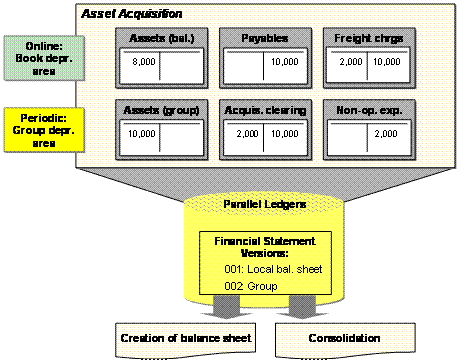
Parallel Valuation
You can also have the system directly update the values of periodically posting depreciation areas during the posting transaction. (For more information, see Posting APC Automatically from Depreciation Area to General Ledger.)
● To use this function, you have to make settings for the depreciation area in Customizing for Asset Accounting. Choose Integration with the General Ledger →Post APC Values Periodically to the General Ledger → Maintain Posting Rules for Parallel Accounting Principles. Set the PostDirect indicator.
Starting in Release ERP2004, this function has been replaced with the functions of the new general ledger. You now no longer need a special ledger. Instead, you post to a ledger in the General Ledger Accounting (FI-GL) component. If you upgraded to Release ERP2004 from an earlier release, you can still use the ledgers of the Special Ledger (FI-SL) component. However, you are restricted to using your existing posting rules. It is not possible to create new posting rules.
Updating G/L Accounts Using APC Values Posting Report
Using the APC Values Posting report, you can post changes to APC values of all depreciation areas to the appropriate G/L accounts, when the depreciation area is defined in Customizing for periodic or direct posting.
On the SAP Easy Access screen, choose Accounting → Financial Accounting → Fixed Assets → Periodic Processing → APC Values Posting.
When the report is executed, the system posts APC transactions based on the settings for the given depreciation area. Posting is either to the accounts in the account determination of the depreciation area, or, when a Different Depreciation Area is specified in the area definition, to the accounts of that different area.
The report generates one document for each month and affiliated company. The line items of the document reflect the needed information (for example, one line item for each account determination or business area). These line items are created in the same way as those for the online posting transaction. The accounts are posted in the same way as with the online posting transaction.
Start Parameters
When starting the report, you can enter only the company code, not the periods to be posted. The report always posts all transactions that took place up to the start date of the report, and which were not yet posted to General Ledger Accounting. In addition, any cancelled documents from depreciation areas that post directly are re-posted.
You enter the document type for posting in the company code settings for Asset Accounting. This document type has to be assigned to a number range with external number assignment
In Customizing for Asset Accounting, choose Integration with the General Ledger →Post APC Values Periodically to the General Ledger → Specify Document Type for Periodic Posting of Asset Values.
First execute a test run, and correct any errors that are listed in the log. The update run of the report has to be executed using background processing, in order to improve system performance. Therefore, start the report as a background job. In the report selection screen, choose Program → Execute in Background.
Consolidation
The system always uses the consolidation transaction type from the originally used transaction type when both of the following apply: the system is posting a transaction affecting APC values and this transaction is from a depreciation area for parallel valuation that is posted periodically to the general ledger.
The system requires the posting amount both in the foreign currency and in the local currency for the group consolidation. Therefore, for APC postings, the system posts the amount in group currency from the group depreciation area to the corporate group ledger, in addition to the amount in the local currency from the group depreciation area managed in local currency.
For more information, see Requirements for Consolidation.
Special Reserves
There are also derived depreciation areas that do not manage acquisition and production costs, but that are used for creating special reserves (for example, area 03 special tax depreciation for Germany). These depreciation areas also have to be posted periodically as parallel valuation. For these derived areas, the program posts the proportional value adjustments resulting from retirements, transfers, post-capitalization, and so on.

An asset has depreciation areas: 01 book depreciation, 02 tax depreciation, 03 special depreciation (derived from 02 minus 01). You post a complete retirement to this asset (asset value date 12/31). The acquisition and production cost was 1000, the asset has a useful life of 10 years, and is in the 4th year of use. The three depreciation areas would then have the values below:
Area |
01 |
02 |
03 |
APC |
1000 |
1000 |
0 |
Prop. accumulated depreciation |
-300 |
-600 |
-300 |
Prop. depreciation current fiscal year |
-100 |
-50 |
50 |
Current book value |
600 |
350 |
-250 |
The system posts the 600 being retired from the book depreciation area online automatically within the framework of the retirement transaction. No automatic posting takes place for area 02. The write-off of the special reserve amount of -250 is carried out by the periodic posting of changes to APC in area 03.
For more information on the transfer of values from depreciation areas to General Ledger Accounting, see Depreciation Areas).
Parallel Financial Reporting in Asset Accounting
In Asset Accounting, you can meet different financial reporting needs using multiple depreciation areas. If you need parallel financial reporting in your SAP System, that is you need valuation and financial statements based on different accounting principles, you have to create a separate depreciation area for each accounting principle. Different accounting principles in asset accounting differ primarily in the following:
● Determination of Depreciation
● Capitalization of fixed assets produced in-house
You enter the different depreciation rules, useful lives, and so on, of the individual accounting principles in separate depreciation areas. The system then determines depreciation for each depreciation area in parallel, using the depreciation rules that were entered. This depreciation is posted separately for each depreciation area.
For more information, see Parallel Financial Reporting in Asset Accounting.