
 Expanding a Copy Block

Use
In the Copy Blocks table, the copy block field displays the copy block exactly as it appears in the Normal tab of the View Text Block Detail dialog (figure in Editing a Copy Block).
Once you start linking copy blocks to family table records, you can expand the copy block to see the results of any functions, operators, or conditional statements included in the copy block. The expanded results apply to the selected record only.

Because the functions, operators, and conditional statements included in a copy block get their values from the records to which the copy block is linked, you can view or copy expanded copy blocks only from the copy block lookup field of a selected family table record. Viewing or copying expanded copy blocks from the Copy Blocks table includes only the formatted text of the copy block.
Procedure
To view the expanded copy of a copy block:
...
1. Switch the Data Manager to Family Mode.
2. In the Family Hierarchy pane, select the family containing the copy block you want to see expanded.
3. MDM displays the unexpanded copy block in the copy box lookup field of the Record Detail tab, as shown in the figure below.
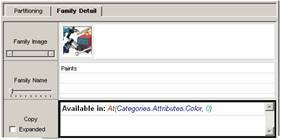
4. Check the Expanded box below the name of the copy box lookup field to view the expanded copy, as shown the figure below
