
 Editing a Copy Block

Use
You can edit copy blocks using a built-in WYSIWYG copy block editor as described in this section.
The View Text Block Detail dialog (figure below) has three tabs:
● Normal. Displays and allows you to edit the formatted copy.
● CBML. Displays and allows you to edit the raw CBML.
● Expanded. Displays the copy block in its finalized form, including any field or attribute values from its linked record set.
Procedure
To open the Text HTM Detail dialog:
Double-click on the Text HTML lookup field cell or right-click on the cell and choose Edit Detail from the context menu.
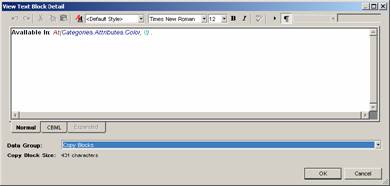
The table below describes the toolbar buttons in the View Text Block Detail dialog (most are also available as commands from the context menu).
Button (Keyboard Shortcut) |
Tooltip |
Description |
|
Undo |
Undoes the last action. |
|
Redo |
Redoes the previously undone action. |
|
Cut |
Cuts the selected text to the clipboard. |
|
Copy |
Copies the selected text to the clipboard. |
|
Paste |
Pastes the text from the clipboard. |
|
Manage Styles |
Manages the available styles. |
|
Styles |
Changes the style of the selected text. |
|
Font Name |
Changes the font of the selected text. |
|
Font Size |
Changes the size of the selected text. |
|
Bold |
Makes the selected text bold. |
|
Italic |
Makes the selected text italic. |
|
Underline |
Underlines the selected text. |
|
Tokens |
Selects a token. |
|
Toggle Show Returns |
Shows paragraph marks in the text box. |
|
Value Types |
Shows the argument type and value. |


To edit an existing copy block:
...
1. In the Records pane, select the copy block record you want to edit.
2. In the Record Detail pane, double-click on the Copy Block cell, or press Enter to open the Text Block Detail dialog.
3. Make sure the Normal tab is the active tab and edit the copy block by typing text and using the toolbar controls to manage styles and fonts as well as add references to fields and variables.
4. When you are done editing, click the Save button to save copy block record, and then click OK to close the dialog.

MDM saves the changes automatically if you click OK without first clicking the Save button.
If you want to abandon the changes you have made, click Cancel without clicking the Save button.