
 Record
Detail Tab
Record
Detail Tab

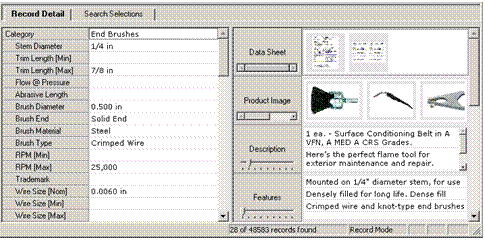
The Record Detail tab (tabs pane) displays the field and attribute values of records selected in the Records pane. Inside the tab, each field and attribute name is displayed as a row header with the corresponding value for the selected record(s) appearing next to it. You can edit field and attribute values directly from this tab.
If the current table contains lookup fields into object tables, the Record Detail tab is split vertically into two subpanes: the left subpane contains a vertical list of the record’s field and attribute values; the right subpane contains the record’s object lookup field values.
See Editing Record Details for more information about editing values in the Record Details tab.