
 Log
Cells
Log
Cells

An example of a log field is shown in the figure below. MDM allows you to manage a set of timestamped blocks of text within a single log field. You can add, modify, or delete a log field entry by double-clicking on the cell in the Record Detail tab to open an edit dialog (for more information, see Editing Log Lookup Fields). Alternatively, right-click on the text area of the cell and choose Add from the context menu.
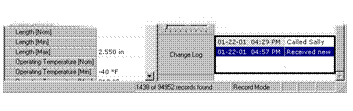

To change the row height of the cell, drag the row splitter up or down.