
 Qualified Lookup Cells

An example of a qualified lookup field is shown in the figure below. You can link one or more qualified table records to a qualified lookup field by double-clicking on the cell in the Record Detail tab to open the qualified lookup selector dialog (for more information, see Editing Qualified Lookup Tables).
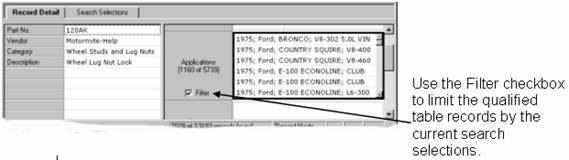

Unlike other types of lookup tables, which typically use just a single display field for the lookup field value, each qualified table record will usually have multiple display fields, which can include any of the fields of the qualified table itself, as well as any of the qualifiers.
Each qualified lookup value is the concatenation of the values of the multiple display fields and qualifiers, separated by vertical bars (|).This concatenated value is displayed as the value of the qualified table record in the qualified lookup cell and also in the qualified lookup search tab.
Directly underneath the name of the qualified lookup field, MDM displays “[m of n]” (where ‘n’ is the total number of qualified table records linked to the current main table record and ‘m’ is number of those n records that match the current search selections for the qualified lookup field). The two numbers will be the same if: (1) the Filter checkbox is not currently checked; or (2) there are no search selections currently in effect for the qualified lookup field.