
 Editing Qualified Lookup Tables

A qualified lookup table defines the set of qualified table records that appear in the qualified lookup selector dialog when you edit a qualified lookup field (see Editing Qualified Lookup Fields for more information). A qualified lookup table is shown in figure below.
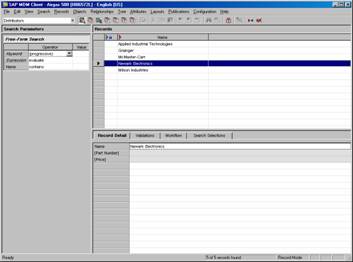
When a qualified lookup table is selected as the current table, the qualified table’s fields (but not its qualifiers) are displayed as columns on the Records pane. The Record Detail tab, however, includes both the fields and qualifiers of the qualified table, with qualifier names enclosed in square brackets ([ ]). This allows you to specify for each qualified table record:
● The values for each of the fields
● The valid qualifier values for each of the qualifiers.
Unlike other types of lookup tables, which usually use a single display field for the lookup field value, a qualified table will often uses multiple display fields, whose values are concatenated together and separated by semicolons (;).

Unlike other types of lookup tables, which may or may not themselves have lookup fields, a qualified table itself often has one or more lookup fields to enforce consistency when defining each qualified table record, and to facilitate drilldown search.
These lookup fields appear:
■ As traditional search tabs when the current table is the qualified table
■ Within the subpane of the qualified lookup search tab when the current table is the main table, for use as part of a drilldown search by qualified table record
■ As search tabs within the qualified lookup selector dialog that opens when you double-click on a qualified lookup field to assign one or more qualified table records to a main table record, to help narrow down the set of qualified table records to a manageable number