Understanding the Ranking Lists in the Memory Inspector
Using the Ranking List
Like the Dominator Tree, the Ranking List offers a list of the dynamic memory objects in your program ranked by size. It also cross references dynamic memory objects and the references to them.
The special strength of the Ranking List is comparing memory snapshots. You cannot compare earlier and later memory snapshots with the Dominator Tree.
By comparing memory snapshots in the Ranking List, you can quickly see where changes have occurred in the memory consumption of dynamic memory objects between the earlier and later memory snapshots.
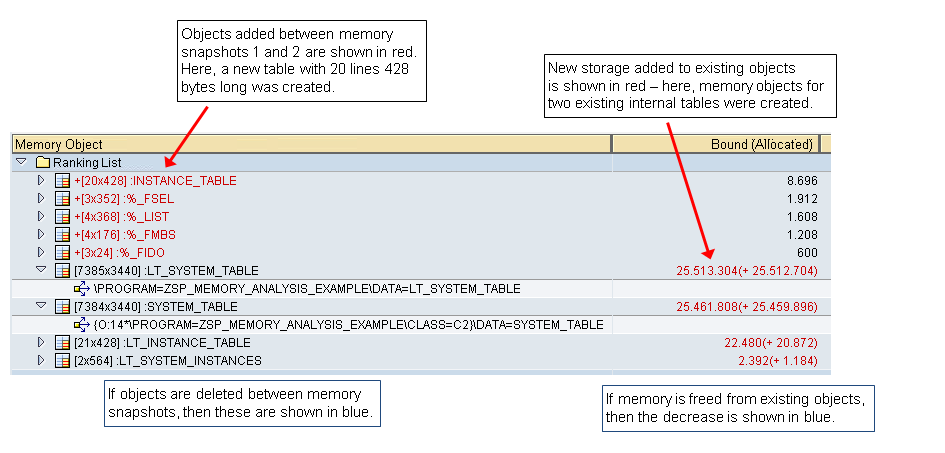
A comparison between snapshots shows only changes in memory use:
-
New objects and new memory allocated for existing objects are shown in red with a + sign at the front.
-
Deleted objects and freed memory in existing objects are shown in blue with a - sign at the front.
-
New, existing, and deleted objects are separately ranked by size. You will see, for example, separate rankings from 1 to n for the largest new memory objects, for the largest increases in existing objects, and for the largest decreases in existing objects and largest deleted objects. Also, the limit on the items in the lists applies separately to each of these categories.
Unlike the Dominator Tree, the Ranking List lists all memory objects on a single level, without showing containment and bound-memory relationships between the objects. Use the Dominator Tree if you need to see bound-memory relationships.
Interpreting Snapshot Comparisons Snapshots in the Ranking List
Use the color coding in the snapshot comparison to guide your analysis. Red shows where new storage has been allocated. Blue shows where memory has been released.
It is usually easy to understand why new memory objects were created - you can see in the program code where these objects came into being.
It is sometimes less easy to understand why memory for existing objects has been added. Especially with respect to value-semantic objects - internal tables, strings, and boxed components - tracking the references to the objects helps you pinpoint why and exactly where in the code new copies of these objects were created in memory. Use the single snapshots displays in the Ranking List or Dominator Tree to track changes in references.
In the comparison of memory snapshots shown above:
-
Several new memory objects have been added. Only one of them, INSTANCE_TABLE, is likely to be of interest to the application programmer. The other new objects were created by the ABAP infrastructure for purposes of internal table management.
-
Two internal tables that already existed in the first memory snapshot have received more memory, shown in red in the Bound (Allocated) column.
The single reference to each table and the differing numbers of entries in each table (7385 entries in LT_SYSTEM_TABLE and 7384 entries in SYSTEM_TABLE) already provide strong clues as to why new storage was allocated. In the earlier memory snapshot, the table reference variables probably pointed to a shared table body in memory. New entries added via these table reference variables forced ABAP to create a new separate copy of the shared table for each variable. (See Value Semantics in the Concepts section.)
To follow up these clues, you would switch to the t_0 (first snapshot) and display the Dominator Tree or Ranking List. Here, you see the list of references to the original shared memory object. In the first snapshot, the shared table had 7383 entries and was shared by LT_SYSTEM_TABLE and the SYSTEM_TABLE in class object C2, among other table reference variables.
 Figure 2: Analyzing Changes in Memory Use by Following References to Memory Objects
The comparison view (above) shows that entries were added to the internal table bodies referenced by LT_SYSTEM_TABLE and SYSTEM_TABLE in the instance of class C2. The entry counts shown in the display increased from 7383 in the original table object in memory to 7384 and 7385 entries, respectively. In response, the ABAP infrastructure provided separate copies of each table in memory, in obedience to the value semantic.
Using the Ranking List by Type
Like the Ranking List, the Ranking List by Type sorts all of the memory objects in the internal session by size, so as to show the most significant users of memory.
But unlike the Ranking List, the Ranking List by Type aggregates memory use by type of object. The view aggregates memory use only for reference-semantic objects - class objects and anonymous data objects.
The Ranking List by Type is particularly useful for assessing the impact of smaller class or data objects on memory use and for assessing the impact of the different types of objects in use in a program.
A poorly designed ABAP Objects program might retain many thousands of instances of an ABAP class over a long run time. Though each object may be quite small, their aggregated memory use can still be significant. The individual objects will never appear at the top of the rankings in the Dominator Tree or Ranking List. But in the Ranking List by Type you can quickly see how these objects influence memory use.
As with the Ranking List, the Ranking List by Type is particularly useful for comparing memory snapshots. In this example, you can see that a series of objects of type ABAP Class C1 has been created. The new instances are aggregated as increased storage allocated to class C1. The objects of class C1 consume in total around 235 KB of storage. 123 KB of that storage is due to the new instances added between the two memory snapshots.

In the example, you can also see that a series of internal tables has been added. Value-semantic objects - internal tables, strings, and boxed components - are not aggregated in the Ranking List by Type. For that reason, each INSTANCE_TABLE internal table - although bound by the new class instances - is listed as though it was an independent top-level memory object.